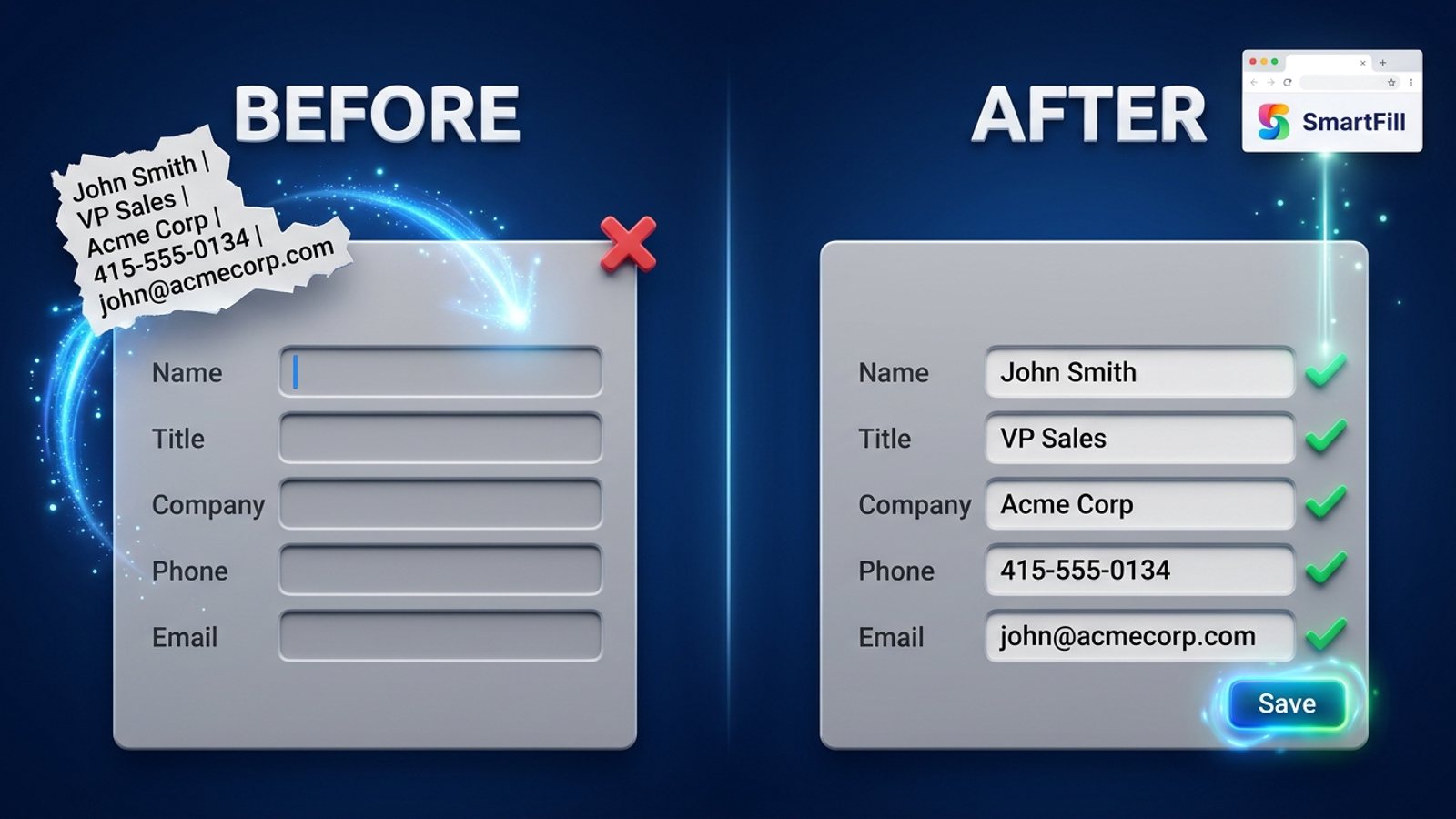
If you sell alone, the best Salesforce data entry tool is the one with the least setup and the fewest keystrokes per lead. For most solo sellers that is a salesforce data entry tool solo sellers can run without admin help — an AI form filler that pastes messy lead text straight into the open Salesforce record. SmartFill does exactly that: no configuration, free to start.
Salesforce's 2026 State of Sales report, as summarised by Spiich in September 2026, puts data entry and admin at about 13% of a sales rep's workweek — roughly 5.2 hours of 40 — against 22% spent meeting customers. When you're the whole sales team, those hours come straight out of selling.
Ready to skip the typing? Install SmartFill Free and fill your next lead in one click.
How should a solo seller choose a Salesforce data entry tool?
Choose by two numbers: how long setup takes, and how many steps stand between a lead and a saved record. Feature lists are built for teams with admins. You have neither the admin nor the time.
A solo seller's leads usually arrive as an email signature, a LinkedIn bio, a call transcript or a scrap of notes. The tool that wins is the one that turns that text into a filled Salesforce form without you reformatting anything first.
What are the main ways to get data into Salesforce?
There are four practical routes, and they differ far more in preparation than in price. The RavenApps blog (vendor blog, September 2026) lists them as Data Import Wizard, Data Loader, a Flow or integration, or pasting into an editable grid — and notes the first two both need a CSV plus a mapping step.
Here is how they stack up for one person:
- Manual entry — open the object, click New, type every field, save. Zero setup, slowest per record. The Skyvia blog (vendor blog, updated October 2026) calls manual one-by-one creation "a full-time job no one wants."
- Web-to-Lead — a Setup-generated HTML form you paste onto your own website, per Microsoft Learn (May 2025).
- Data Import Wizard — a prepared CSV with a header row and required fields, mapped field by field, up to 50,000 records per import per the Skyvia blog.
- A form builder or AI filler — either a paid form platform, or an extension that fills the open record from text you already have.
Notice what routes 2 and 3 have in common: both make you build or prepare something before a single lead lands.
Which Salesforce data entry tool is best for a one-person sales team?
Of the tools we compared, SmartFill is our pick for a solo seller, because it is the only one here that fills the Salesforce form already open on your screen from text you paste as-is. You install it in about 10 seconds, no sign-up, open Salesforce and your source text in two tabs, copy the messy lead details, and click the SmartFill icon. The form fills itself.
It handles email signatures and LinkedIn bios without you parsing them first, works on any Salesforce form — leads, contacts, accounts, all of it — and can fill unlimited fields at once. Text is processed in real time and not stored, and no lead database is built. The free plan gives you 5 fills to start, then 3 per day forever; Pro is $9.99/month for unlimited fills (as of November 2026, prices can change). It's desktop Chrome only.
The owner's framing is simple: it turns a roughly 4-minute form fill into about a 3-second click.
The comparison
| Option | Best for | Key features | Price / free option | Watch-outs |
|---|---|---|---|---|
| SmartFill (Our pick) | Filling the open Salesforce form from pasted text | AI fill from messy text, any Salesforce form, no setup | Free: 5 fills, then 3/day; Pro $9.99/mo | Desktop Chrome only |
| Manual entry | One-off records you want to read as you type | Built-in screens, zero setup | Free (built-in) | Slowest per record |
| Web-to-Lead | Website form submissions becoming leads | Setup-generated HTML form | Included with Salesforce | Needs a website; 500 requests/24h per Titan DXP |
| Data Import Wizard | Bulk loads of many records at once | CSV mapping, up to 50,000 records | Included in Setup | Needs a clean CSV and mapping first |
| Formstack | Teams wanting forms, documents and e-sign in one place | Salesforce object mapping, form builder | From $83/mo billed annually | Priced for teams, not solo sellers |
Prices for Formstack are as of November 2026 and can change. SmartFill prices are as of November 2026 and can change.
Where each option honestly fits better
If you mainly need to capture new submissions from a website form, Web-to-Lead or Formstack is the more direct choice — that's what they're built for. Formstack's own pricing page (read November 2026) lists Forms from $83/month billed annually ($99 monthly) for one builder user, and the Ranktracker roundup (vendor blog, July 2026) describes it as an all-in-one suite whose cost may exceed what a forms-only user wants to pay.
If you're loading hundreds of records from a spreadsheet, the Data Import Wizard is the right tool. Just know the Skyvia blog's warning: most import failures happen before upload — bad format, missing required fields, no header row, duplicates — and "cleaning up after a bad import takes days."
If you want a single lead in from an email or LinkedIn profile right now, none of those routes fit. That's the gap SmartFill closes. Install SmartFill Free and try it on your next lead.
How much setup does each tool need?
Setup is where solo sellers lose the most time, and it varies enormously. Manual entry and SmartFill need none. Web-to-Lead needs you to enable it in Setup, generate HTML and paste it on a live site. The Data Import Wizard needs a cleaned, mapped CSV every time. Formstack needs a plan chosen, a form built, fields mapped and the form embedded.
What about bulk imports — when should you stop typing?
Switch to a bulk import when you have a batch of records from one source, not when you have one lead. The Data Import Wizard handles up to 50,000 records per import for accounts, contacts, leads, campaign members, solutions and person accounts, per the Skyvia blog (updated October 2026) and Salesforce Trailhead's data management module.
For a solo seller, that's usually a purchased list or an event attendee sheet — a one-time job, not a daily habit. Daily lead flow is one record at a time, which is exactly where manual entry and bulk tools both fall short.
Do you need a CRM admin to set these up?
No — but some routes are admin-shaped work even when you do them yourself. Web-to-Lead and the Data Import Wizard live inside Salesforce Setup, and Formstack needs a connector configured. None requires a specialist, but each costs you an afternoon you could spend selling.
SmartFill needs no admin work at all: install the extension, open Salesforce, paste, click. That's the whole setup.
How do you avoid duplicates with each route?
Duplicate risk depends on the route, not the tool's marketing. The Titan DXP blog (vendor blog, December 2025) describes Web-to-Lead duplicate prevention as error-prone. The Skyvia blog notes that import duplicates come from bad match keys — a missed mapping leaves duplicate leads and orphaned contacts.
Manual entry and SmartFill both start from a record you're looking at, so you can check for an existing lead before you save. That's a workflow habit, not a guarantee — our recommendation is a quick search on the email address first.
For a deeper look at how these tools differ by role, see our guide to the best Salesforce data entry tool for account executives and the roundup of Salesforce data entry automation tools in 2026.
Sources
- Salesforceとの連携に最適なフォームビルダー(2026年版) (Ranktracker, vendor blog, 2026-07-27)
- Configure lead management for Salesforce (Microsoft Learn, 2025-05-27)
- Import CSV into Salesforce: 3 Methods, Limits and Lookups (Skyvia, vendor blog, updated 2026-10-29)
- Complete Guide to Web-to-Lead Salesforce Limits (Titan DXP, vendor blog, 2025-12-17)
- Formstack Pricing (Formstack, read 2026-11-26)
- Formstack Pricing (2026) — Plans & Costs (Outmano, 2026-10-04)
- Troubleshooting a Non-Functional Web-to-Lead Form (Salesforce Help, 2026-09-28)
- Why sales reps don't update the CRM (Spiich, 2026-09-26)
- Salesforce Trailhead: data management module (Salesforce, undated)
- Import data into Salesforce from Excel (RavenApps, vendor blog, 2026-09-24)