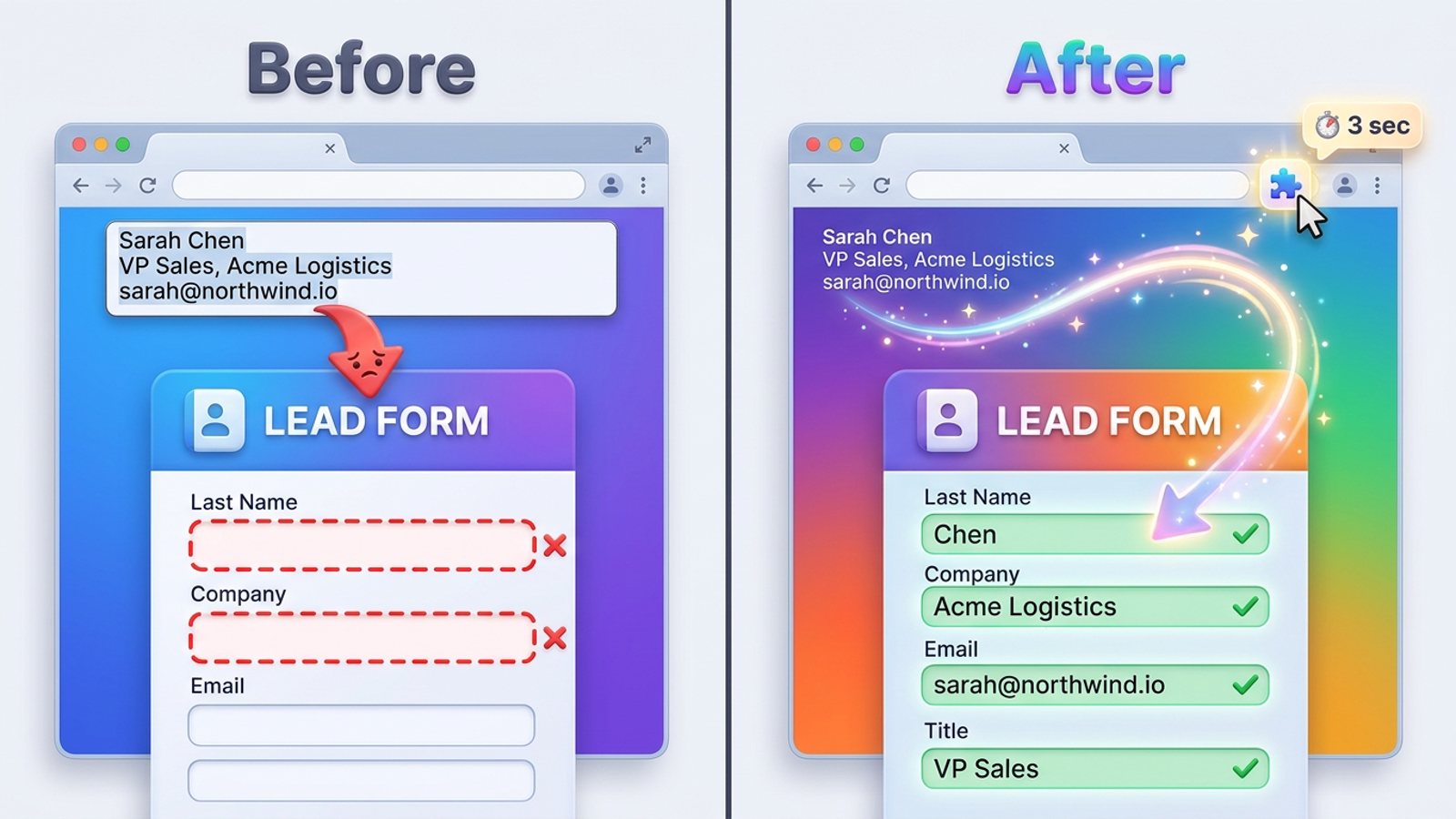
No tool in this comparison publishes compliance certifications, so the honest answer is to judge a secure AI Salesforce form filler by how it handles your lead data. SmartFill processes pasted text in real time and stores none of it, builds no lead database, and needs no sign-up — which is why it's our pick of the tools we compared.
Install SmartFill Free and fill your next Salesforce lead record from a messy email signature in seconds.
How do you judge a secure AI form filler for Salesforce?
Start with one question: what happens to the lead text after the form is filled? Everything else — speed, field coverage, price — matters less if the answer is vague.
Chrome's developer documentation says extensions that collect or transmit user data should limit permission requests to what the feature actually needs, because fewer permissions mean less data can accidentally leak (Chrome for Developers, no date given). That single principle separates most of the options below.
Chrome's activeTab permission is a good example of restraint: it grants temporary access to the current tab only when you invoke the extension, is cut off when you navigate away, and shows no install warning. Broad host permissions are the opposite — they sit open across sites.
Two more checks worth running before you install anything:
- Read the data-handling sentence in the privacy policy. Look for whether text is stored, and for how long.
- Check the permission list on the install screen. A filler that only needs to act when you click it shouldn't need your whole browsing history.
Why is SmartFill our pick for secure Salesforce form filling?
Because it does the job and then keeps nothing. SmartFill is a Chrome extension that uses AI to populate Salesforce forms from any text you paste — including messy email signatures and LinkedIn bios — and the text is processed in real time, not stored. No lead database is built.
That matters for a privacy-first buyer. The data path is short: you copy text, click the extension, the form fills. There's no account to create, no profile to maintain, no library of your prospects accumulating in a vendor's system.
The practical upside is speed on top of privacy. The owner's stated goal is turning 4-minute form fills into 3-second clicks, with zero setup or learning curve. In practice:
- 10-second install, no sign-up required.
- Free plan: 5 fills to start, then 3 per day forever.
- Pro plan: unlimited fills for $9.99/month (as of November 2026; prices can change).
- All Salesforce objects — leads, contacts, accounts, everything — and unlimited fields at once.
- Works in any Salesforce setup that runs in a Chrome browser, Classic or Lightning.
Say you're an SDR and a prospect replies to your cold email with a signature block: name, title, company, direct line, and a calendar link buried in the middle. Copy the whole block, open the lead record, click SmartFill. The name, title, company and phone land in the right fields — you don't parse the signature by hand.
The safest filler is the one that has nothing to leak after the form is filled.
What are the best options compared on data handling?
Here are the options from the research, with the product first.
| Option | Best for | Key features | Price / free option | Watch-outs |
|---|---|---|---|---|
| SmartFill (Our pick) | Fast fills from messy text | AI fills any Salesforce object from pasted text | Free: 5 fills, then 3/day; Pro $9.99/mo | Desktop Chrome only |
| Einstein Autofill (Beta) | Teams staying inside Salesforce | Call and chat suggestions in Lightning | No separate price published | Beta; setup and permissions first |
| Manual copy-paste | Zero third-party exposure | Full human control | Free in tool cost | Slow; invites dirty data |
| Salesforce Web-to-Lead | Standardized capture at entry | Fixed fields at the source | Not found in material | Unvalidated submissions |
| Generic AI autofill extensions | Non-Salesforce forms too | Broad autofill across sites | Not found in material | Varying data handling |
SmartFill is our pick of the tools we compared because its data handling is the easiest to state plainly: real-time processing, nothing stored, no lead database. It fills all types of Salesforce forms, and it also works on other forms — though Salesforce is the focus. SmartFill is made by the team behind this blog.
Einstein Autofill (Beta) turns call and chat conversations into form suggestions and applies to Lightning Experience in Enterprise and Unlimited editions of several Industries clouds (Salesforce Spring '25 Release Notes). It keeps processing inside the Salesforce platform, which privacy teams tend to like. The trade-offs: it's labeled Beta and subject to beta terms, and setup runs through three steps — generative AI configured, a Setup toggle, then a full permission list assigned to reps (Salesforce Dictionary, 2026-07-31). If your team already lives in Lightning and wants nothing installed, it's the more direct choice.
Manual copy-paste is the only route with no third-party extension at all. Nothing leaves the browser beyond the CRM itself, and you control every character. The cost is time, plus error rate: dirty data from manual and bulk entry is a documented CRM problem (SourceForge Articles, 2026-09-23), and duplicates distort conversion rates and lead to bad spend decisions (zuleikallc.com, 2026-02-07).
Salesforce Web-to-Lead captures standardized fields at the point of entry, which the material recommends for clean lead routing (zuleikallc.com, 2026-02-07). The catch is that unvalidated form submissions are named as a source of dirty CRM data (SourceForge Articles, 2026-09-23). It's a front-door control, not a filler for records you're building by hand.
Generic AI autofill extensions — FillGenius, AutoFormAI, Magical, docFiller — vary widely. FillGenius markets AI autofill for CRM forms including Salesforce and HubSpot and claims to map fields by context rather than field name (Chrome Web Store; ExtPose, 2026-06-09). AutoFormAI says all data is stored locally (Chrome Web Store, 2025-11-15), while its own store disclosure says it handles personally identifiable information, authentication information and website content — and a security report flags its broad host and identity permissions as medium-risk (Koidex, 2024-11-13). docFiller's policy states form data is sent to third-party AI models and it cannot guarantee whether those providers retain it (Firefox Add-ons, 2025-01-02). If you mainly need autofill outside Salesforce, these are the more direct choice — just read each policy first.
Try SmartFill free — 5 fills to start, no sign-up, and you can see how it handles your messiest lead text.
Do AI form fillers store my lead data?
Some do, some don't — and the difference is usually written in the privacy policy, not the marketing page. SmartFill's owner confirms that none of the information sent to the AI is saved, so text is processed and discarded.
The wider picture is mixed. The Chrome Web Store's Limited Use policy requires extensions to collect, use and transmit only the data necessary for their disclosed single purpose (Chrome for Developers, no date given), and the store's user data rules require an accurate privacy policy, Limited Use compliance and modern cryptography for transmission (Safeguard, 2026-10-18). Those are the rules. Enforcement is the variable.
Our recommendation: before you install any filler, open its privacy policy and search the page for the word "store." If you can't tell within a minute whether your pasted text is retained, don't paste a real lead into it.
Which permissions should a Salesforce form-filler extension ask for?
Only the ones it needs to do the fill — nothing more. Chrome's guidance is explicit that permission requests should be limited to what the feature needs (Chrome for Developers, no date given).
For a form filler, the honest minimum is access to the page you're filling at the moment you click. Chrome's activeTab permission does exactly that: temporary access to the current tab, cut off when you navigate away, no install warning. Broad host permissions that run across every site you visit are a different risk category, because they widen what could leak.
A quick checklist:
- Does it act only when you click? Good sign.
- Does it request identity or authentication permissions? Ask why a filler needs them.
- Does the store listing disclose what data it handles? It's required to.
How do you stop dirty data entering Salesforce in the first place?
Layer your defenses: clean capture, validation, and duplicate rules. Filling a form fast is only useful if what lands in the record is correct.
Salesforce validation rules stop incorrect data being saved without Apex, keeping data integrity in place (SFDC Developers, 2026-08-14). Matching rules on email, domain and phone, plus standardized required fields, help prevent duplicates (zuleikallc.com, 2026-02-07). Admins also struggle with dirty data arriving from list uploads by employees with too many permissions (SourceForge Articles, 2026-09-23).
So the setup that works looks like this:
- Fill from the source text rather than retyping — fewer transcription errors.
- Validate on save with rules on the fields that matter most.
- Match on email and domain to catch duplicates at entry.
- Review permissions so only the people who need bulk upload access have it.
Is Einstein Autofill the same as a Chrome extension filler?
No. Einstein Autofill is a Salesforce feature that runs inside Lightning and turns call and chat conversations into form suggestions, while a Chrome extension filler works on the page you're already on and doesn't require Salesforce-side setup.
The practical differences come down to setup and scope. Einstein Autofill is Beta and subject to beta terms, applies to Lightning Experience in Enterprise and Unlimited editions of several Industries clouds (Salesforce Spring '25 Release Notes), and needs generative AI configured, a Setup toggle flipped, and a full permission list assigned before reps see anything (Salesforce Dictionary, 2026-07-31). A Chrome extension installs in seconds with no admin work.
There's also a naming collision worth knowing about. Salesforce's Summer '26 release notes describe a Document AI feature also called "SmartFill" that populates record fields by uploading documents, available in Lightning Experience in Developer, Enterprise, Performance and Unlimited editions (Salesforce Summer '26 Release Notes). That's a Salesforce feature, not the SmartFill extension in this article — different tools, same word.
If you mainly need suggestions generated from recorded calls inside Salesforce, Einstein Autofill is the more direct choice. If you need to fill a lead record from text you copied out of an email, a Chrome filler is.
Sources
- Protect user privacy (Chrome for Developers)
- Chrome Web Store Limited Use policy (Chrome for Developers)
- Chrome Web Store user data policy explained (Safeguard, 2026-10-18)
- Are Your Chrome Extensions Spying on You? (Panda Security, 2026-02-26)
- Einstein Autofill (Beta) release notes (Salesforce)
- Einstein Autofill setup (Salesforce Dictionary, 2026-07-31)
- Document AI SmartFill release notes (Salesforce)
- Are You Leaving the Front Door of Your CRM Open? (SourceForge Articles, 2026-09-23)
- Salesforce Validation Rules examples (SFDC Developers, 2026-08-14)
- How To Use Salesforce (zuleikallc.com, 2026-02-07)
- FillGenius listing (Chrome Web Store)
- FillGenius on ExtPose (2026-06-09)
- AutoFormAI listing (Chrome Web Store, 2025-11-15)
- AutoFormAI security report (Koidex, 2024-11-13)
- Magical auto form filler (Magical)
- docFiller privacy policy (Firefox Add-ons, 2025-01-02)