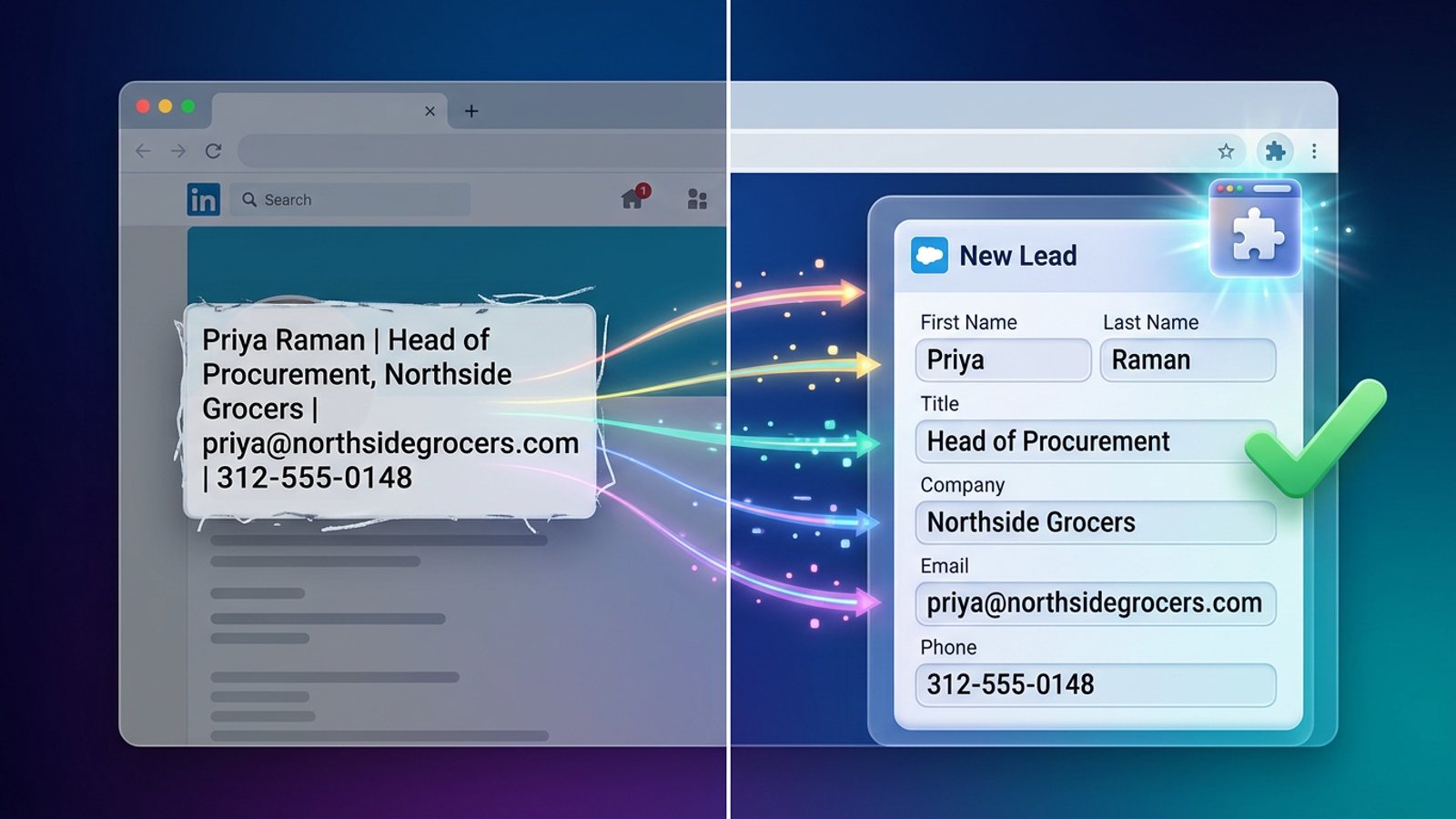
If you're a founder pasting LinkedIn bios and email signatures into Salesforce lead forms, the best autoformai alternatives founders should consider is SmartFill — a Chrome extension that AI-fills Salesforce Lead, Contact, Case and custom-object forms straight from messy pasted text, with no setup. Chrome's built-in autofill, Salesforce Web-to-Lead, Typeform, Jotform and plain copy-paste are the other realistic options.
Install SmartFill Free and paste your next LinkedIn bio straight into a new Lead.
What is AutoFormAI, and why isn't it built for Salesforce lead entry?
AutoFormAI is a general-purpose Chrome extension that fills web forms from a personal information library you build from resumes, emails or notes. Its own listing says it fills forms "in one click" from that library — it makes no Salesforce-specific claim in the copy captured.
That matters for a founder. AutoFormAI's model is "save your details once, reuse them everywhere." Your job is different: every lead has different details, arriving as a jumbled block of text you just copied from LinkedIn or an email footer. You don't want to build a library per lead.
The listing also shows 47 users at the copy captured, and a third-party catalog (extenshi.io) gives it an automated "Risky" safety score — that score is static analysis, not a security audit, so weigh it accordingly. A software directory (SaaSHub) lists it as freemium with a $1.99 per-usage figure; treat that as directory data, not AutoFormAI's own published pricing.
What should a founder compare before choosing an AutoFormAI alternative?
Compare on four things: what the tool fills from, whether it works on Salesforce Lightning, what setup it needs, and what happens to your lead data.
- Source of data. A library-based filler reuses saved details. A lead-entry tool parses whatever you paste, per record.
- Salesforce compatibility. Lightning Web Component inputs handle JavaScript events differently from what browser autofill expects — a QuickForm blog (2026) describes 10–30-field workflows still taking 5–10 minutes.
- Setup. Web-to-Lead needs Salesforce admin access and a live web page. Extensions install per user.
- Data handling. Ask plainly: does it store my leads?
Which AutoFormAI alternatives are worth it for founders? (compared)
Here are the options we compared, SmartFill first because it's the one built for this exact job.
| Option | Best for | Key features | Price / free option | Watch-outs |
|---|---|---|---|---|
| SmartFill (Our pick) | Pasting messy lead text into Salesforce | AI fills from any pasted text; all objects; no setup | Free: 5 fills, then 3/day; Pro $9.99/mo | Desktop Chrome only; duplicates "coming soon" |
| Chrome autofill | Saved addresses and cards | Nothing to install | Free with Chrome | Unreliable on Lightning inputs |
| Salesforce Web-to-Lead | Inbound leads from your own site | Native lead creation, assignment rules | Included with Salesforce | Website forms only; needs admin |
| Typeform | Conversational public forms | Multi-page, conditional logic | Not stated in our sources | Builds forms, doesn't fill records |
| Jotform | Cheap public forms | Form builder with Salesforce link | Not stated in our sources | Builds forms, doesn't fill records |
| Doing it by hand | One-off leads | Full control | Free | Roughly 2–3 minutes per record |
SmartFill (Our pick). It reads unstructured text and separates jumbled fields — the problem of Title and Company landing on one line is exactly what it handles. It states it builds no lead database and doesn't retain pasted text. Pro is $9.99/month as of November 2026, and prices can change. Start with SmartFill's free plan — 5 fills to try, then 3 per day forever.
Chrome built-in autofill. Free and already there. But it was "designed for static HTML forms," and Salesforce's Lightning inputs "require JavaScript events, not the direct DOM writes Chrome fires." A Salesforce partner wiki also notes that lightning:input ignores the autocomplete attribute. If you mainly need saved addresses and cards, Chrome autofill is the more direct choice.
Salesforce Web-to-Lead. A native feature that turns a form on your own website into a new Lead, with standard or custom fields, assignment rules, auto-response emails and optional reCAPTCHA (Thunderbit tutorial, updated 2025). Its limit is structural: it can't log a lead you found on LinkedIn. It also fails quietly — Understory (2026) reports it returns HTTP 200 whether or not a record is created — and drops fields it doesn't recognise.
Typeform and Jotform. Third-party form tools add validation, conditional logic, multi-page forms and file uploads over Web-to-Lead, per a CloudAmp guide on the Salesforce AppExchange (a vendor guide; Salesforce states it hasn't reviewed AppExchange listings). But they build forms respondents fill in — they don't fill an existing Salesforce record from pasted text. If your leads arrive through a form you control, they're a reasonable route.
Doing it by hand. Free, and full control over every field. Simular.ai (2026, vendor blog) puts manual LinkedIn-to-Salesforce entry at roughly 2–3 minutes per record. At 20 leads a day, that's most of an hour gone.
SmartFill is made by the team behind this blog.
How does SmartFill fill a Salesforce lead form from a LinkedIn bio?
You copy the messy text, open Salesforce, click the icon, and the form fills. No URL patterns, no regex mapping — the listing calls it "Zero Setup to Start."
Say you run a bakery and you've just found a promising wholesale buyer on LinkedIn. Their bio reads: "Priya Raman | Head of Procurement, Northside Grocers | priya@northsidegrocers.com | 312-555-0148." One line, four fields, plus a company that isn't a person.
- Copy the whole block — bio, signature, contact card, whatever you have.
- Open Salesforce in desktop Chrome and start a New Lead.
- Click the SmartFill icon, paste the text and hit Auto-Fill.
- Review every field before saving — especially Title vs Company when they sit on the same line.
That's the whole workflow. The 4-minute form fill becomes a few seconds, and you never retype a phone number.
The real win isn't the seconds saved on one form — it's that logging a lead stops being the reason you skip logging one.
Is Chrome's built-in autofill enough for Salesforce Lightning forms?
No — it's unreliable on Salesforce Lightning. Chrome's autofill was built for static HTML, and Lightning Web Component inputs expect JavaScript events rather than the direct DOM writes Chrome fires (QuickForm blog, 2026).
The symptoms you'll recognise: fields silently skip, or a form throws an error. A tidyleaf guide notes that when Chrome can't recognise a form, "you cannot fix from your side." Chrome autofill also can't take a LinkedIn bio and split it into First Name, Last Name, Title, Company and Phone — it fills saved blocks, not parsed text.
Use it for what it's good at: your own name, address and card details. Use something else for lead records.
Do you need a Salesforce admin to set these up?
No for browser extensions, yes for Web-to-Lead. Extensions like SmartFill install per user in about 10 seconds with no sign-up. Web-to-Lead, by contrast, needs admin access, a defined list of Lead fields, an auto-response email template, a public page and a lead assignment plan (Thunderbit, updated 2025).
For a founder without admin rights, that settles it: the extension route is the one you can do today.
How do you choose between a form filler and Web-to-Lead?
Ask one question: where did the lead come from? If a visitor typed their details into your website form, Web-to-Lead is the native answer. If you found them on LinkedIn, got an intro email, or met them at an event, you need a form filler that parses text you already have.
Many founders end up with both: Web-to-Lead for the website, a filler for everything else.
Is your lead data stored when you use a form filler?
SmartFill states it builds no database of your leads and that pasted text is parsed in real time and not retained afterward. AutoFormAI states data is stored on the user's device.
Install SmartFill Free and turn your next messy LinkedIn bio into a clean Salesforce Lead in seconds.
Sources
- AutoFormAI — Chrome Web Store (2025-11-15)
- AutoFormAI — Chrome Web Store listing
- AutoFormAI extension report (extenshi.io, 2025-11-15)
- AutoFormAI reviews and details (SaaSHub)
- AutoFormAI about (AlternativeTo, 2024-11-24)
- SmartFill: The AI Form Filler for Salesforce (Chrome Web Store, updated 2026-10-19)
- How to autofill Salesforce records and forms in Chrome (QuickForm blog, 2026-06-09)
- Chrome autofill not working on some forms (tidyleaf guide)
- Browser Autocomplete / AutoFill Issue (ClosePlan wiki)
- Tutorial Passo a Passo: Formulários Web to Lead no Salesforce (Thunderbit, updated 2025-07-21)
- Tutoriel pas à pas : créer des formulaires Web-to-Lead dans Salesforce (Thunderbit, updated 2025-07-21)
- WordPress.org support replies
- Salesforce Web-to-Lead Forms: The Version That Works (Understory, 2026-09-27)
- CloudAmp's Ultimate Guide to Salesforce Web-to-Lead Forms (Salesforce AppExchange)
- How to Sync LinkedIn Leads to Salesforce (simular.ai, 2026-08-18)