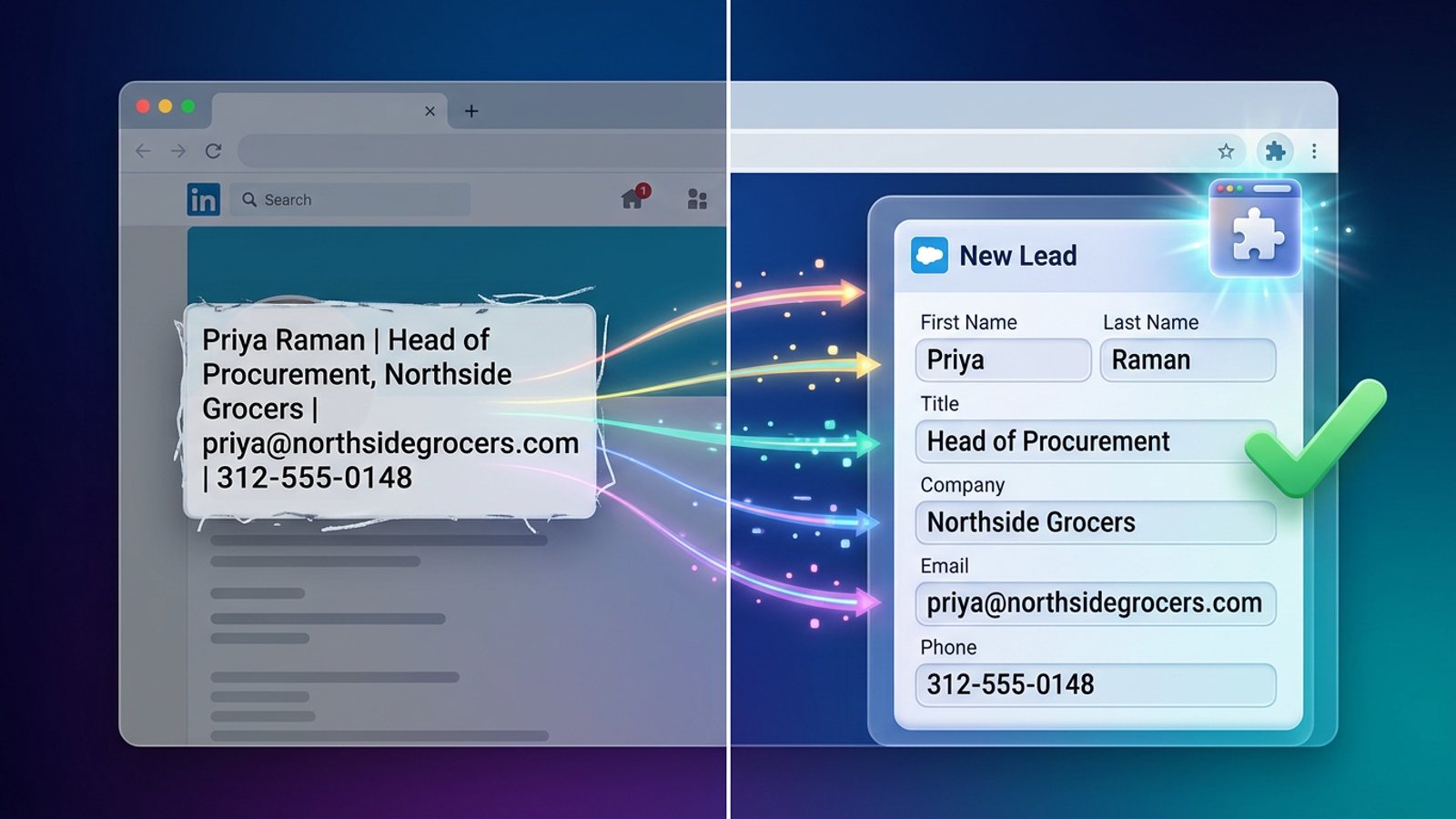
If you're filling Salesforce from messy pasted lead text — an email signature, a LinkedIn bio, a paragraph from a call — SmartFill is the closest fit: a Chrome extension built for Salesforce that maps raw text into any object, with unlimited fields. Magical suits reps who want one autofill tool across their whole stack. Chrome autofill and Salesforce Quick Create are the free, manual baseline.
The short answer is that you have four realistic routes: a Salesforce-first AI filler, a cross-app text expander, the browser's own autofill, or Salesforce's native record creation. Which one wins depends on one question — do you have messy lead text to parse, or tidy snippets to reuse?
If it's the first, this is the job SmartFill was built for. You can install SmartFill free and test it on a single lead in about ten seconds.
What is AutoFormAI, and why do Salesforce users look for alternatives?
AutoFormAI is a general one-click AI form filler. Its Chrome Web Store listing, checked 15 November 2025, describes it as an "AI-powered auto form filler" that identifies form elements and fills them from a personal information library built from resumes, emails or notes, stored on the user's device.
That's a useful tool. It's just not a Salesforce tool. The same listing shows 47 users and files it under "Extension / Tools" — a small, general-purpose extension rather than a CRM product. For a buyer whose job is logging leads from a messy email into Salesforce Lightning, that distinction is the whole decision.
There are also risk signals worth knowing about, not verdicts. A security-review site flagged AutoFormAI for broad host permissions and identity/authentication permissions, both rated "medium" (Koidex, 13 November 2024). A third-party extension directory gave it a "Risky" automated security score, noting the score is automated static analysis and "does not prove malicious intent" (extenshi.io, 15 November 2025). Read those as prompts to check permissions yourself, not as proof of anything.
How do the alternatives compare for filling Salesforce forms?
Here's the comparison, with the Salesforce-first option first. Prices for other tools are as of November 2026 and can change.
| Option | Best for | Key features | Price / free option | Watch-outs |
|---|---|---|---|---|
| SmartFill (Our pick) | Messy lead text into any Salesforce object | AI maps pasted text to fields; unlimited fields; no setup | Free: 5 fills, then 3/day; Pro $9.99/mo | Desktop Chrome only |
| Magical | One autofill tool across your whole stack | Text expander plus autofill; Salesforce integration claim | Free tier; paid plans on vendor site | Label-based, not prose parsing; broad data disclosure |
| Chrome autofill | Personal details on simple forms | Built into Chrome, zero install | Free | Struggles with Lightning fields |
| Salesforce Quick Create | Users who already know the values | Native record creation, no extension | Included with licence | Still manual typing |
Our pick is SmartFill of the tools we compared, because it's the only one on this list built specifically for the job in the title: turning unstructured lead text into a Salesforce record. It fills Leads, Contacts, Cases and custom objects — the owner confirms it handles everything — with unlimited fields per form, and processes your text in real time without storing it. You can try SmartFill on your next lead before you commit to anything.
SmartFill is made by the team behind this blog.
SmartFill: the Salesforce-first AI form filler
SmartFill is a Chrome extension that uses AI to populate Salesforce forms from any pasted text. Its Chrome Web Store listing describes it as "the AI form filler built for Salesforce," filling Leads, Contacts, Cases and custom objects from messy unstructured text such as an email signature or a LinkedIn About section.
The workflow is four steps and needs no configuration:
- Install the extension — one click, no sign-up.
- Open Salesforce and your source text in separate tabs.
- Copy the lead details, even if they're a ragged paragraph.
- Click the SmartFill icon and watch the form fill.
On privacy: the product facts state that nothing sent to the AI is saved, and SmartFill's privacy policy (effective 13 July 2025) declares compliance with the Chrome Web Store User Data Policy and its Limited Use requirements. No lead database is built.
Pricing, as of November 2026 and subject to change: the free plan gives 5 fills to start, then 3 per day forever; Pro is $9.99/month for unlimited fills.
Magical: the cross-app text expander
Magical describes itself as a text expander and autofill automation app, used by "100K companies" and "950,000 users" per its Chrome Web Store listing (updated 4 April 2026), and says it automates "7+ hours" of repetitive work a week. It claims to work on "10,000,000+ apps" including Salesforce, Zendesk, Gmail and LinkedIn, with official integrations for Salesforce, HubSpot and Zoho.
The mechanism matters. Magical's own help centre (20 October 2024) documents the autofill flow as labelling each source field once, then reusing those labels to fill the form. That's excellent for repetitive, predictable entry — the same rep pasting the same blocks into the same fields every day.
It's a different job from parsing raw prose. A vendor comparison (Aiformfills blog, vendor content, 1 September 2026) frames the market split as text expansion versus semantic AI parsing of raw text — and argues text expansion is losing ground as forms get more complex. Treat that as a vendor's view, but the mechanism it describes is real.
Magical's listing also discloses that it handles personally identifiable information, location, web history, user activity and website content, declaring the data isn't sold to third parties. That's a normal disclosure for a tool with this reach — just know it's broader than a single-CRM filler.
If you mainly need one autofill tool across Gmail, LinkedIn and Salesforce together, Magical is the more direct choice.
Chrome's built-in autofill: free, but not built for Lightning
Chrome autofill is free and already in your browser. It was designed for static HTML forms — and that's the problem.
A QuickForm blog post (9 June 2026) argues that Salesforce Lightning Web Component fields are rendered and managed by JavaScript, and Chrome's scanner doesn't fire the events those fields need. The same source estimates a 10–30-field Salesforce workflow still takes 5–10 minutes even when your data is already saved in Chrome. It also cites StatCounter putting Chrome at about 70% of global browser share in 2026.
Our recommendation: use Chrome autofill for your own name, address and card details, and don't expect it to log a lead for you.
Salesforce Quick Create and inline editing: native, but manual
Salesforce's own Quick Create and inline editing are included with your licence — no separate fee appears in the material reviewed here — and nothing leaves Salesforce. For a user who already knows every field value, that's a clean, fast path.
What it doesn't do is parse. You still type or paste each field yourself. That's reasoning from the alternatives rather than a cited Salesforce claim, since Salesforce's own docs weren't part of this material.
Adjacent vendor tooling shows where the gap is being filled: AI Cowork for Salesforce, a Chrome extension, reads pasted meeting or call notes and maps them to record fields with a preview-before-apply step, picklist warnings and lookup resolution.
Can I paste a messy email signature and have the tool figure out the fields?
Yes — with an AI parser, not with a text expander or browser autofill. This is the exact scenario that separates the options.
Say you run a two-person sales team and a prospect replies with a signature block: name, title, company, direct line, mobile, a LinkedIn URL, and a line about the deal in the body. With SmartFill you copy the whole thing, click once, and the fields populate — including custom fields, since the owner confirms unlimited fields and all objects. With Magical you'd need to have labelled those source fields beforehand. With Chrome autofill you'd type it.
How do I switch from AutoFormAI to a Salesforce-first filler?
Switching takes about ten minutes. Here's the sequence.
- Audit what you fill. List the Salesforce objects you touch (Lead, Contact, Case, custom) and the fields that actually matter.
- Try the free baseline first. Run one lead through Chrome autofill and one through Quick Create, so you can see where manual typing still costs you time.
- Install a Salesforce-first filler. SmartFill installs from aismartfill.com in one click, no sign-up.
- Open a New Lead form and copy your messiest real source text.
- Click once and review the mapped fields before saving; adjust anything that landed wrong.
- Repeat on a Contact, a Case and a custom object to confirm coverage.
- Compare time per record against your AutoFormAI or manual baseline, then decide.
The product facts put the gain at turning a 4-minute form fill into a 3-second click. Measure it on your own records rather than taking that on faith.
Which alternative is best if privacy is my main concern?
It depends what "private" means to you. If it means "no vendor builds a database of my leads," SmartFill's stated position is that nothing sent to the AI is saved. If it means "no third-party extension at all," Salesforce Quick Create is the only option that keeps everything inside Salesforce.
If it means "I want to see exactly what data a tool declares," read each Chrome Web Store privacy disclosure before installing. Magical's, for instance, lists PII, location, web history, user activity and website content. AutoFormAI's listing says its library is stored on your device.
None of this is legal advice, and data-handling rules vary by place — check with your own compliance contact before rolling any extension out to a team handling customer data.
What should I pick?
If your bottleneck is messy lead text that needs to become a Salesforce record, pick SmartFill: Salesforce-first, unlimited fields, any object, no setup, and a free plan that costs you nothing to test. If your bottleneck is repetitive typing across many apps, Magical is the better fit. If you want zero third-party tools, stay native.
For a broader shortlist beyond AutoFormAI, see our roundup of the best AI Salesforce form fillers for sales teams in 2026, and if security is the deciding factor, the best secure AI form filler for Salesforce lead data covers that ground in detail.
Ready to stop typing lead data? Install SmartFill Free and fill your next Salesforce form from a pasted paragraph.
Sources
- AutoFormAI — Chrome Web Store (2025-11-15)
- AutoFormAI extension catalog & safety score — extenshi.io (2025-11-15)
- AutoFormAI security report — Koidex (2024-11-13)
- AutoFormAI vs FormBuddy — SaaSHub (2026-03-22)
- AutoFormAI about — AlternativeTo (2024-11-24)
- Magical: Text Expander & Autofill — Chrome Web Store (updated 2026-04-04)
- Magical Help Center: Autofill forms, web apps and databases (2024-10-20)
- Magical Help Center: Core plan (2026-02-03)
- How to autofill Salesforce records and forms in Chrome — QuickForm blog (2026-06-09)
- AI Form Fills vs. Magical — Aiformfills blog, vendor content (2026-09-01)
- SmartFill: The AI Form Filler for Salesforce — Chrome Web Store
- SmartFill for Salesforce Privacy Policy — inventabot.com (effective 2025-07-13)
- AI Cowork for Salesforce — Chrome Web Store