Neither tool is built Salesforce-first. Magical is a mature text expander and autofill app that works across 10M+ apps, including Salesforce, but it fills from fields you label once. FillGenius stores your data once and fills forms from saved profiles. For messy pasted lead text, a dedicated AI form filler for Salesforce fits better.
If you're an SDR with a LinkedIn profile in one tab and a New Lead form in the other, the question isn't which extension has more features — it's which one gets that lead into Salesforce before you lose the thread. Install SmartFill Free and see the difference on your next lead.
How does Magical fill a Salesforce lead form?
Magical fills Salesforce by reusing fields you have already labelled once. Its documented flow is manual setup: open the tab with the source information, click the pencil, label each field once, then reuse those labels to fill the form — that's how Magical's own help center describes autofilling forms, web apps and databases (Magical Help Center, 2024-10-20).
After that first setup, the fills are fast. Magical also lets you combine templates and website info in one fill action for CRM admin work (Magical Help Center, 2024-10-27), which suits repeatable records where the same fields come from the same place every time.
The scale is real: Magical describes itself as a text expander and autofill automation app used by 950,000 users at 100,000+ companies, automating "7+ hours" of repetitive work per week, and says it works across "10,000,000+ apps," listing Salesforce among its sales-tool integrations (Chrome Web Store, Magical listing). The same listing shows a 200,000-user count in a different spot — Google's own listing data is inconsistent here.
How does FillGenius fill a Salesforce lead form?
FillGenius fills by storing your data once and reusing it. Its documented flow: add your data once (you can import from a PDF), install the extension, open the form, choose the data set, and the fields auto-populate (fillgenius.com, vendor site).
It markets itself as an "AI-powered Chrome extension that auto-fills any web form in one click," and says it "learns your common inputs and intelligently maps them to any form — even ones it hasn't seen before," because it "understands context, not just field names" (Chrome Web Store, FillGenius listing, updated 2026-06-10). It names Salesforce, HubSpot and Pipedrive as CRM use cases, alongside support, ops and general data entry.
Two vendor claims matter for lead entry: FillGenius says it "works on 90% of forms" and that it "never submits forms automatically and never shares your data" (fillgenius.com).
The install base is small. The same Chrome listing shows 281 users and a 3.4/5 rating from 5 ratings, and marks the developer as "Non-trader" — which affects EU consumer rights. That's not a reason to dismiss it, but it is a reason to test it on your own Salesforce org before rolling it out to a team.
Which one handles messy pasted lead data better?
Neither vendor page documents parsing an arbitrary pasted block — an email signature, a LinkedIn blurb, a paragraph from a call note — into Salesforce Lead fields. Magical's documented flow starts from labelled fields; FillGenius's starts from a saved data set. Both assume the data already exists in a structure you set up.
That matters because messy pasted text is the actual daily job. Say a prospect replies to your cold email and signs off with name, title, company, phone and a LinkedIn URL in five lines of plain text. With a profile-based filler, you either add that person as a new data set first, or you fall back to copy-pasting field by field — the baseline SmartFill's own Chrome listing describes: open Salesforce, click "New Lead," copy-paste First Name, Last Name, Email, Phone, Title, Company, one field at a time.
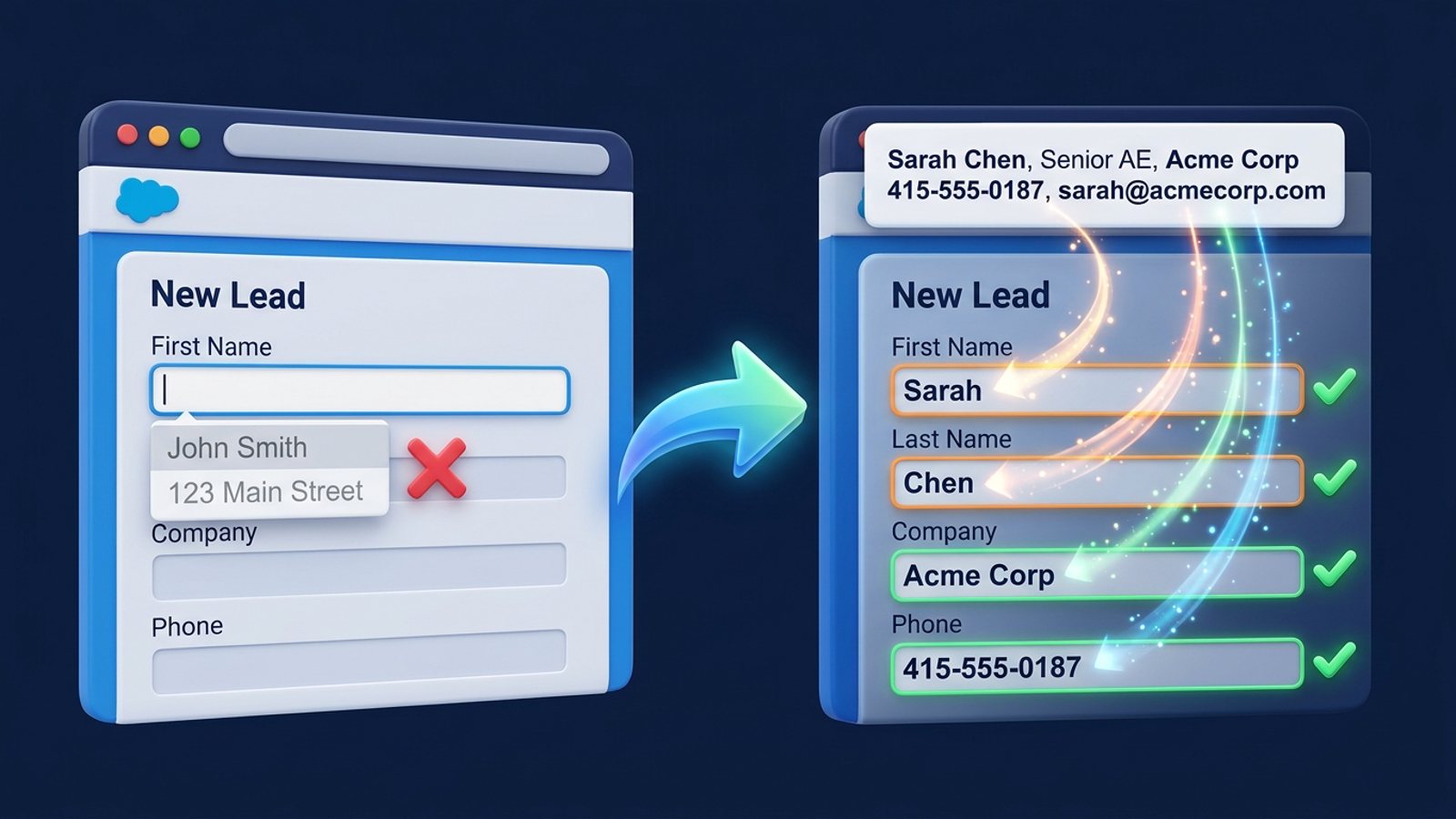
This is the gap a Salesforce-specific AI filler is built for. SmartFill takes the pasted text as-is and fills the form from it — email signature, LinkedIn bio, or a paragraph — with no field labelling and no profile to build first.
FillGenius vs Magical: side-by-side comparison
Here are the options we compared, with SmartFill first because it's the one built for this exact job.
| Option | Best for | Key features | Price / free option | Watch-outs |
|---|---|---|---|---|
| SmartFill (Our pick) | Salesforce lead entry from messy text | Paste text, AI fills the form; any Salesforce object; unlimited fields | Free: 5 fills, then 3/day; Pro $9.99/mo | Desktop Chrome only |
| Magical | High-volume text entry across many apps | Text expander; 10M+ apps; Salesforce listed; templates | Free tier per third-party trackers; paid plans not publicly priced | Label each field once |
| FillGenius | Storing a profile once, filling any form | AI context mapping claim; PDF import; never auto-submits | Trackers disagree: free 5 credits vs paid-only | 281 users; 5 ratings |
| Salesforce Quick Create | Clean data, pre-filled New Lead page | URL defaultFieldValues pre-populates fields | Included with Salesforce | You build the URL yourself |
| Chrome built-in autofill | Simple static forms | Saved address/profile data | Free with Chrome | Reported to miss Lightning fields |
SmartFill is our pick of the tools we compared for one reason: the job in the title is Salesforce lead entry from lead data, and that's the only thing it does. You paste the text, click, and the form fills — no labelling step, no data set to build, and it works on any Salesforce object and any number of fields. It installs in about 10 seconds with no sign-up, the free plan gives you 5 fills then 3 per day forever, and Pro is unlimited fills for $9.99/month as of November 2026 (prices can change). The honest limit: it's a desktop Chrome extension, so no mobile.
SmartFill is made by the team behind this blog. It is not like, endorsed by or compatible with Magical or FillGenius.
If you mainly need one text expander across Gmail, LinkedIn, Zendesk and your CRM, Magical is the more direct choice — it's the mature product with the widest app coverage. If you want a lightweight profile-based filler and you're comfortable testing a small, new extension, FillGenius is the simpler of the two. And if your data is already clean and structured, Salesforce's own pre-filled New Lead URL costs nothing.
What does each tool cost?
Magical's paid prices are not published on a public pricing page — they're viewed inside the extension, per its help center (2026-02-03). Its Core plan is for individuals with unlimited text expansion and no additional members; teams need Advanced. Third-party trackers put Core at about $7 per user/month (SoftwareSuggest, last updated 2026-06-29) and Pro from about $10/month with a free entry plan (finde.tools, checked 2026-07-11). Treat those as tracker estimates, not vendor prices.
FillGenius's pricing is only visible through third-party trackers, and they conflict: EffectHub (2026-08-22) lists a free tier with 5 credits, Pro at $9/month for 4,000 credits, Pro Yearly at $79/year for 48,000 credits and extra credits at $10 for 150 fills, while AIToolHub lists it as paid-only with no free tier. FillGenius's own site and Chrome listing did not publish a price on the pages read.
Salesforce Quick Create is included with Salesforce at no separate price (Salesforce Dictionary, 2026-06-15), and Chrome's built-in autofill is free with Chrome (QuickForm, 2026-06-09).
Which is better for Salesforce Lightning specifically?
Neither vendor page makes a Lightning-specific claim we can point to. Magical's help docs describe labelling source steps (2024-10-20); a competing vendor's blog argues Chrome's built-in autofill fails on Salesforce Lightning Web Component fields because they need JavaScript events rather than direct DOM writes (QuickForm, 2026-06-09 — a vendor blog, so weigh it accordingly).
What that means practically: Salesforce Lightning forms are not ordinary HTML forms, so a generic filler can look like it works on a test page and behave differently inside your org. Our recommendation: open a real New Lead form in your own Salesforce, run one fill, and check every field landed — especially picklists and lookups.
SmartFill works from a Chrome browser as a Chrome extension, so it covers Salesforce Classic and Lightning alike, and it fills any Salesforce object — leads, contacts, accounts, cases, custom objects — with no limit on the number of fields.
What's the fastest way to fill a Salesforce lead from pasted text?
Paste the messy text, then let an AI filler map it into the form. That's the sequence that removes the typing rather than moving it. Here's how the options compare step by step:
- Magical: open the tab with the source data, click the pencil, label each field once, open the Salesforce New Lead form, run the fill from the Magical box.
- FillGenius: store your data once (optionally import from a PDF), install the extension, open the New Lead form, choose the data set, let the fields populate.
- Salesforce Quick Create: build the New Lead URL with an encoded
defaultFieldValuesstring, open it, and finish any fields the URL doesn't cover. - Chrome autofill: rely on saved profile data — and expect it to miss Lightning-rendered fields.
- SmartFill: open the New Lead form, paste the messy source text, click once, and the fields populate.
Steps 1 and 2 both have a setup cost before the first fill. Steps 3 and 4 need your data to already be clean. Step 5 is the only one that starts from whatever text you happen to have.
If the tool asks you to type the lead's details in before it can fill the lead's details in, you haven't automated the job — you've relocated it.
Ready to stop retyping leads? Install SmartFill Free and fill your next Salesforce lead from the text you already have.
Sources
- Magical Chrome Web Store listing (Google, updated 2026-04-04)
- Magical — Autofill forms, web apps and databases (Magical Help Center, 2024-10-20)
- Magical — Fill forms with templates and website info (Magical Help Center, 2024-10-27)
- Magical — Core Plan (Magical Help Center, 2026-02-03)
- Magical (SoftwareSuggest, 2026-06-29)
- Magical pricing (finde.tools, 2026-07-11)
- Magical review (AISO Tools)
- FillGenius Chrome Web Store listing (Google, updated 2026-06-10)
- FillGenius site (FillGenius)
- FillGenius pricing (EffectHub, 2026-08-22)
- FillGenius (AIToolHub)
- Query String Parameter (Salesforce Dictionary, 2026-06-15)
- Pre-populated New Lead URL (Trailhead community, 2022-01-19)
- Best Chrome Extension to Autofill Salesforce Forms (QuickForm, 2026-06-09)
- SmartFill Chrome Web Store listing (Google)