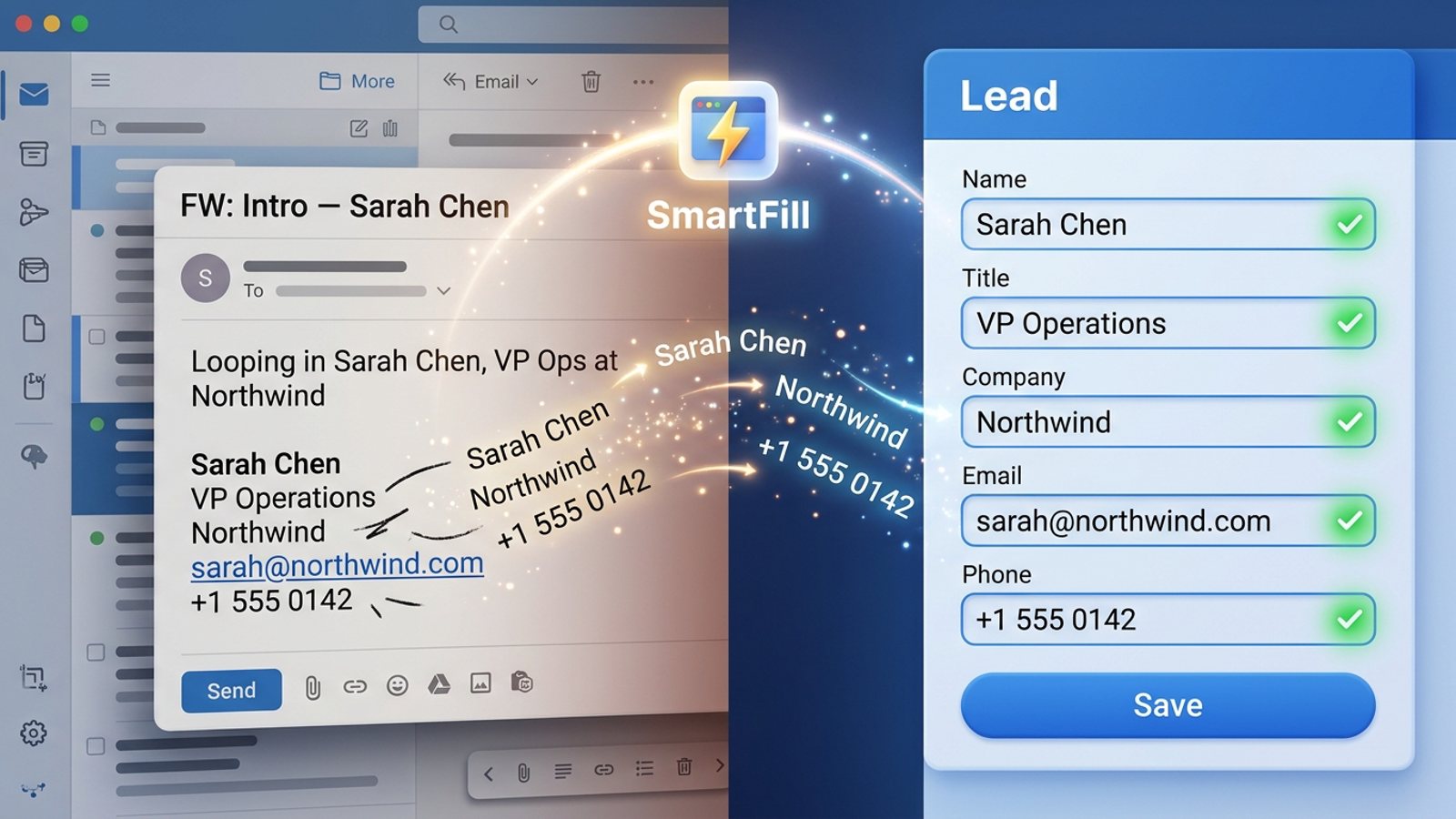
There is no single best tool: it depends on where the data comes from. For pasted, messy text going straight into a custom object record form, a browser extension like SmartFill is the most direct pick — it fills any Salesforce object, with unlimited fields, no setup. For website capture, rule-based updates or bulk imports, native Salesforce tools and form platforms fit better.
If your day is custom objects — renewal trackers, partner records, onboarding objects — the copy-paste tax is worse than on Leads, because there is no standard import button waiting for you. Here is how the options compare, and which one fits which job.
Install SmartFill Free and fill your next custom object record from a pasted email signature in about three seconds.
What is the best tool to autofill Salesforce custom object forms?
For filling a custom object record form from unstructured text you already have — an email signature, a LinkedIn bio, a call note — SmartFill is our pick of the tools we compared. It is a Chrome extension that reads any text you paste and populates the Salesforce form on screen, on any object, with no field mapping set up by hand.
The reason it wins this specific job: the other options assume your data is already tidy. Flow needs criteria and field API names. URL pre-fill needs values encoded into a link. Web-to-Lead needs a form your prospect fills in. SmartFill starts from the mess — a block of text — and works backwards to the fields.
How do the tools compare side by side?
Here is the comparison for the five routes we looked at, with the product first because this is our blog.
| Option | Best for | Key features | Price / free option | Watch-outs |
|---|---|---|---|---|
| SmartFill (Our pick) | Pasted text into any Salesforce object form | AI fill, any object, unlimited fields, no setup | Free: 5 fills then 3/day; Pro $9.99/mo | Desktop Chrome only |
| Salesforce Flow | Rule-based field updates after save | Record-triggered automation, criteria-based | Included in Salesforce | Not for pasted text; needs API names |
| Web-to-Lead / FormAssembly | Website form capture | Native lead forms; FormAssembly builds forms on any object | Web-to-Lead native; FormAssembly pricing not in our sources | Web-to-Lead posts to Lead only |
| Lightning default field values / URL pre-fill | Pre-filling a create page | encodeDefaultFieldValues, URL params, predefined values | Native, no extra price found | Values must already be structured |
| Scratchpad | Updating CRM fields from calls and emails | AI workspace over Salesforce | From $16/mo per user, annual (ToolRadar, 2026) | AI credit usage details listed as a con |
Prices for other tools are as of November 2026 and can change. SmartFill's own prices are as of November 2026 and can change too.
SmartFill is made by the team behind this blog.
Where SmartFill fits — and where it doesn't
SmartFill fills Salesforce forms from any copied text, works with messy data like email signatures and LinkedIn bios, and needs no configuration. The free plan gives 5 fills to start, then 3 per day forever; Pro is unlimited fills for $9.99/month, as of November 2026, and prices can change.
It is desktop Chrome only — that is the honest limit. If your team works on tablets in the field, this is not the tool for that workflow.
Where the native Salesforce options fit
Flow is described by Salesforce-focused sources as the recommended declarative automation tool in 2026, and it is excellent at setting a field value when a record is created or edited, filtered by record type and stage (Volcengine, 2026). It just doesn't read a pasted paragraph. If your problem is "the picklist should update when the deal closes", Flow is your answer, not an autofill extension.
Where the form tools fit
FormAssembly's Salesforce Form Import Tool can build a web form from any object in the org, including custom objects, by picking the object and fields (FormAssembly help, 2025). If your data arrives through a public form rather than a paste, that is the more direct choice.
Can you auto-fill a custom object from a web form?
Not with standard Web-to-Lead. Salesforce forum answers say a standard web-to-lead form only posts to the Lead object; sending web form data into a custom object needs the API or a toolkit such as PHP over SOAP (Salesforce DeveloperForce forum, 2023).
That leaves two practical routes: build the API integration, or use a form tool that already supports custom objects. FormAssembly's import tool is the documented example in our sources. Also worth knowing: Web-to-Lead has no confirmation screen and no input validation out of the box — those have to be built separately (Synergy!LEAD support, undated).
How do you pre-fill fields on a Lightning record create page?
Use default field values through navigation, or a new-record URL. In Lightning Web Components, lightning/pageReferenceUtils with encodeDefaultFieldValues() lets you pass values into a record create page via pageReference.state.defaultFieldValues (Salesforce Developers, undated). The Aura equivalent uses lightning:pageReferenceUtils with standard__objectPage references (Salesforce Developers, undated).
There is also URL pre-fill — often called URL hacking — which opens a new-record URL with a record type ID and field API names so the page loads partly filled, for standard or custom objects (Volcengine, 2026). Quick actions add a third route: Create/Update Record actions have their own layouts and support Predefined Field Values that can be static or formula expressions (Open Exam Prep, 2024).
All three share the same constraint: the values must already be structured and known. None of them reads a paragraph.
Can AI fill custom object fields from messy free text?
Yes — and this is the gap the native options leave. A 2025 Medium write-up by Sarfarey Akram shows a custom build using the Models API, Apex and LWC to map free text to an org's own objects and fields, so the mapping is aware of custom objects without hardcoded lists.
That build is real but it is a development project. SmartFill does the same job from the browser: you copy the text, open the record, click the icon, and the form fills — on any Salesforce object, with unlimited fields. Text is processed in real time and not stored, and no lead database is built.
The real choice in 2026 is not between tools — it is between building a mapping project and pasting the text you already have.
What about bulk tools and spreadsheet-style options?
They solve a different problem: batches, not one-off records. Valorx Wave is a free-forever Chrome extension giving a spreadsheet UI over Salesforce for bulk edits and inserts of thousands of records (Chrome Web Store, 2026). dataloader.io starts at $99.00 per month and handles bulk import, export and delete with scheduled jobs and field auto-mapping (Software Advice, undated).
If you are loading 5,000 renewal records from a CSV, use those. If you are creating one partner record from an email someone forwarded you, a bulk tool is the wrong shape — that is the Salesforce form autofill job.
How do you actually fill a custom object record with SmartFill?
Four steps, no configuration.
- Install the extension in one click from the Chrome Web Store — no sign-up required.
- Open two tabs: the Salesforce custom object record and the text holding the lead details.
- Copy the text — an email signature, a LinkedIn bio, a forwarded intro, however messy.
- Click the SmartFill icon and watch the form fill.
Say you run a partner onboarding object. A rep forwards you an intro email with the company name buried in the signature and the contact's title in the third line. Copy the whole thing, click, and the fields land. That is the four-minute form fill turned into a three-second click.
For more on the mechanics, see the best way to fill Salesforce forms without typing.
Which tool should you pick?
Pick by where your data enters:
- Pasted text into a record form → SmartFill. Any object, unlimited fields, free to start.
- A public web form → FormAssembly's import tool for custom objects, or Web-to-Lead if Lead is enough.
- Values you already know and want pre-loaded → Lightning default field values, URL pre-fill or quick-action predefined values.
- Rule-based updates after save → Record-Triggered Flow.
- Bulk CSV loads → Valorx Wave or dataloader.io.
- Field updates from calls and emails across the team → Scratchpad, from $16/mo per user on the annual plan (ToolRadar, 2026).
If your main need is team-wide conversation intelligence rather than fast record entry, Scratchpad is the more direct choice. If it is one-off record creation from text you already have, SmartFill is.
Install SmartFill Free — 5 fills to start, then 3 a day forever, no sign-up.
Sources
- Synergy!LEAD web form support (Synergy Marketing, undated)
- Salesforce DeveloperForce: custom web-to-lead to custom object (Salesforce, 2023-12-03)
- FormAssembly Salesforce Form Import Tool (FormAssembly, 2025-06-16)
- Navigate to a Record's Create Page with Default Field Values — LWC (Salesforce Developers, undated)
- Navigate to a Record Create Page with Default Field Values — Aura (Salesforce Developers, undated)
- URL hacking prefill by record type (Volcengine, 2026-05-19)
- Predefined Field Values / quick actions (Open Exam Prep, 2024-12-31)
- Record-Triggered Flow picklist autofill (Volcengine, 2026-09-24)
- Create an Automation with Flow (Trailhead, undated)
- Free text to Salesforce data model (Medium, 2025-08-24)
- Scratchpad pricing/review (ToolRadar, 2026-02-03)
- dataloader.io profile (Software Advice, undated)
- Valorx Wave (Chrome Web Store, 2026-09-22)