Magical is a general text expander and autofill tool that works across thousands of apps, not a Salesforce-first form filler. The best alternatives for Salesforce forms are AI form fillers that turn messy pasted text into a filled lead or contact form, plus snippet expanders like TextExpander, Chrome's built-in autofill, Salesforce's native entry, and plain copy-paste — each with a clear trade-off.
If your job is filling a Salesforce lead or contact form from a messy email signature, a LinkedIn bio, or a call transcript, the fastest path is an AI form filler for Salesforce. Install SmartFill Free and you can paste that text and watch the form populate — no snippets to build, no fields to label first.
Why do people look for Magical alternatives for Salesforce?
Because Magical is a text expander first. Its Chrome Web Store listing describes it as a text expander and autofill app used by "950,000 users and 100,000+ companies," working across "10,000,000+ apps," with claimed integrations including Salesforce, HubSpot and Zoho (listing, no date). That breadth is the point — and also the problem when your only job is a Salesforce form.
Magical's own help center (2024-10-20) documents the autofill flow: open the tab with the source info, click the pencil icon, label each field once, then reuse those labels to fill the form. That works, but it is a setup step per form, and it is generic by design.
A third-party review (AISO Tools, no date) describes Magical as not an automation platform — "no scheduler, no webhooks and no multi-step logic" — with everything triggered by a person typing in a browser.
What are the best Magical alternatives for Salesforce forms?
The honest answer depends on which of those three jobs you actually need. Here is the comparison, with SmartFill first because this is our blog and because it is the one tool on the list built Salesforce-first.
| Option | Best for | Key features | Price / free option | Watch-outs |
|---|---|---|---|---|
| SmartFill (Our pick) | Filling Salesforce forms from pasted text | AI fills forms from any copied text; messy data OK; no setup | Free: 5 fills, then 3/day; Pro $9.99/mo | Desktop Chrome only |
| Magical | Cross-app snippets and autofill | Text expansion; autofill automations; claimed CRM integrations | Free tier; Advanced quote-only as of Oct 2026 | Fields labelled once first; not an automation platform |
| TextExpander | Canned snippets across devices | Snippet expansion; syncs Mac, iPhone, iPad, Windows, Chrome | Free plan: 5 active Snippets; Individual $3.33/mo annual | Not Salesforce-first; lapses lose access |
| Chrome Autofill | Saved names and addresses | Built into Chrome; free | Free | Fails on Lightning JavaScript fields |
| Espanso | Local, private snippet expansion | Open-source; OS-level; local .yml files | Free | Not browser-based; not Salesforce-aware |
SmartFill is made by the team behind this blog.
Our pick, SmartFill, is the only option here whose single job is the one this article is about: take text you already have — an email signature, a LinkedIn bio, a rough note — and populate the Salesforce form. It fills any Salesforce object and any number of fields, per the owner, and text is processed in real time and not stored. It works anywhere you run Chrome, which covers Salesforce Classic and Lightning. The limit is real: it is a desktop Chrome extension, full stop.
Magical remains a strong choice if you want one tool that expands snippets in Gmail, Zendesk, LinkedIn and Greenhouse as well as Salesforce. Its autofill automations (formerly "Transfers," per its help center, 2024-11-19) move data between two websites with no APIs. If you mainly need cross-app text expansion, Magical is the more direct choice.
TextExpander suits teams who live on saved snippets. It launched a free plan in October 2026 giving 5 active Snippets, unlimited library storage, unlimited expansions, synced across Mac, iPhone, iPad, Windows and Chrome, plus sharing for up to 5 team members (9to5Mac, 2026-10-07). MacMagazine (2026-10-08) notes the free plan allows swapping one active Snippet every two weeks. Pricing per TextExpander's own blog (2026-03-09): Individual $3.33/month billed annually, Business $8.33/month per user, Growth $10.83/month per user. A lapsed subscription cuts off access to your Snippets, and third-party summaries quote different figures ($5 and $10 per user, MEFMobile, no date) — verify on the official page.
Chrome's built-in autofill is free and already installed. It was designed for static HTML forms, and a QuickForm blog post (2026-06-09) explains why it fails on Salesforce: Lightning Web Components render by JavaScript, so Chrome's scanner doesn't see the fields. The same post estimates a 10–30-field Salesforce workflow can still take 5–10 minutes with Chrome autofill even when the data is saved.
Espanso is the privacy-first pick for people who want snippets stored locally. A forum post (Alura, 2026-05-19) describes it as open-source, running at OS level on Windows, Mac and Linux, with shortcuts in local .yml files. It is not browser-based and not Salesforce-aware.
Why doesn't Chrome autofill work on Salesforce forms?
Because Salesforce Lightning renders its fields with JavaScript, and Chrome's autofill was built to scan static HTML. A Salesforce Stack Exchange thread from 2020-02-21 documents one symptom: Lightning input IDs change on every page reload (for example id="1930:0" becomes 7:4790;a), so anything relying on element IDs breaks.
That is the technical reason a generic tool struggles and a Salesforce-first tool doesn't. Salesforce forms also mix field types — text, number, date, picklist and lookups — and a build has to map fields, detect labels and check picklist values to fill them correctly (Zenn write-up, 2026-02-09).
Can AI really fill a Salesforce form from messy, unstructured text?
Yes. A personal build documented on Zenn (2026-02-09) filled Salesforce opportunity fields from a pasted meeting transcript using the Gemini API, with a user-confirmation step before writing and no auto-save. Another team (Zenn/coconala, 2025-03-26) built an internal Chrome extension where users paste rough info, press send, and an AI structures it and auto-fills the Salesforce form.
A 2026 comparison (SmartAutoFill blog, 2026-07-27) draws the line cleanly: text expanders are best for canned snippets, browser autofill for saved names and addresses, and AI form fillers for open-ended fields that need interpreting from context.
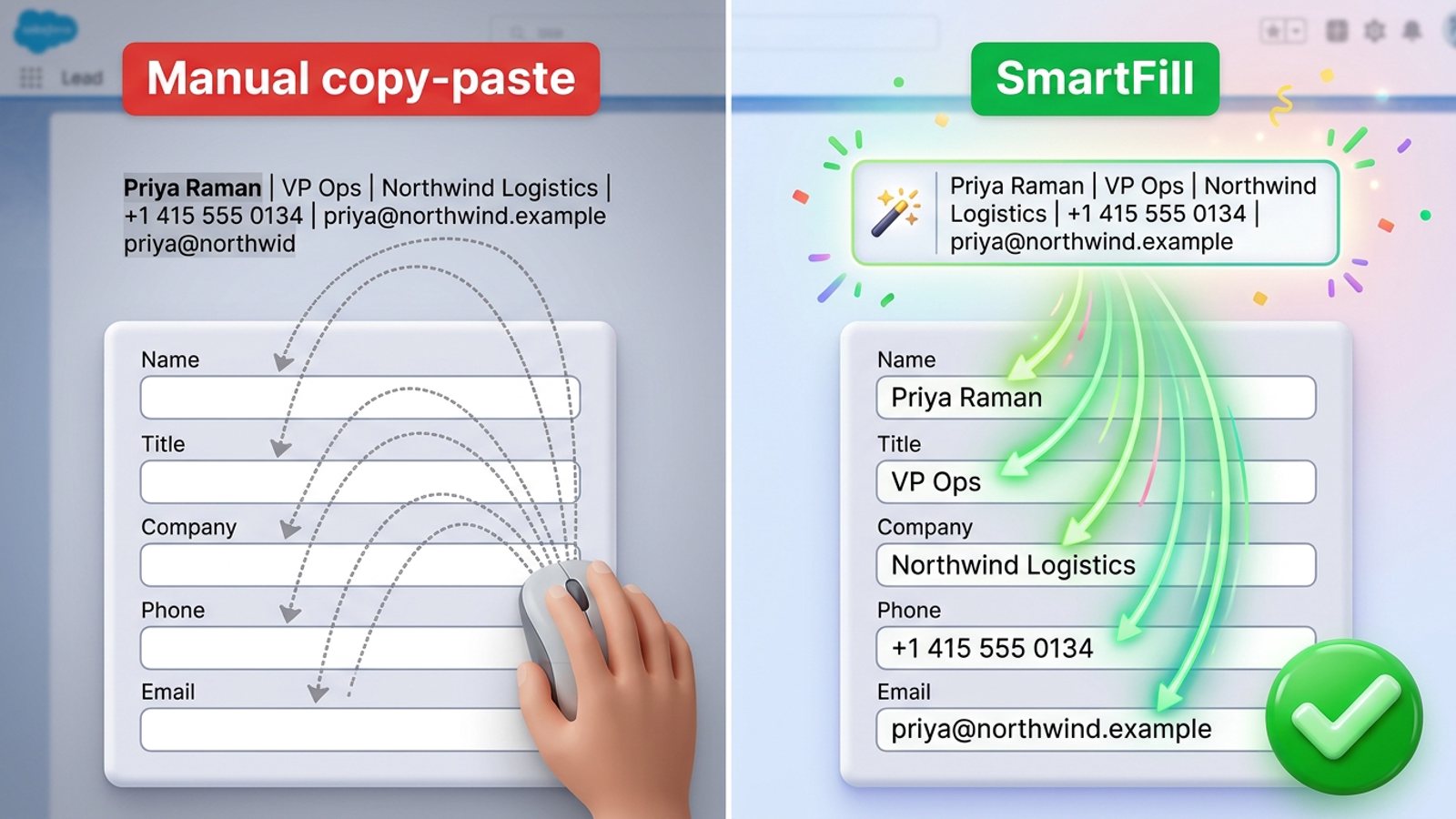
That is the whole job SmartFill does. Say you run a two-person sales team and a prospect's email signature reads "Priya Raman | VP Ops | Northwind Logistics | +1 415 555 0134 | priya@northwind.example." You paste it, click the SmartFill icon, and the lead form fills — name, title, company, phone, email — without you touching a field. The four-minute copy-paste becomes a three-second click.
Our recommendation: keep a human review step on any AI-filled record, especially on picklists and lookups where a wrong value is worse than a blank one.
How do you choose between a snippet expander and a Salesforce form filler?
Start with the one job, not the feature list. Ask what text you have and what you need out of it.
- Define the job. Is it replaying saved text, or interpreting new text into fields? Snippet expanders do the first. AI form fillers do the second.
- Shortlist by type. Snippet expander, browser autofill, native Salesforce entry, or AI form filler.
- Check Lightning support. Confirm the tool works on JavaScript-rendered Salesforce fields, not just static HTML.
- Test your own custom fields and picklists. Generic demos don't cover your org's setup.
- Confirm data handling and review-before-save. Know whether text is stored and whether you can check values before saving.
- Compare total cost on official pricing pages. Re-check prices — they change.
If you want the deeper version of step three, see our guide to the best Salesforce form filler extension for Chrome.
What does a Salesforce-first AI form filler cost?
SmartFill's free plan gives 5 fills to start, then 3 per day forever. Pro is $9.99/month for unlimited fills, as of November 2026 — prices can change.
Compare that with the alternatives on published figures:
TextExpander figures are from its own blog (2026-03-09) and are billed annually; SmartFill's figure is from the product facts as of November 2026. Magical's Advanced plan is quote/contact-sales only with no published self-serve price as of October 2026 (Clipboard History Pro comparison, no date), and a third-party tracker lists Magical Pro from about $10/month, checked 12 July 2026 (finde.tools, 2026-07-11).
Is there a free option that works on Salesforce?
Yes, but read the fine print. Chrome autofill is free and fails on Lightning. TextExpander's free plan gives 5 active Snippets but isn't Salesforce-first. Espanso is free and open-source but not browser-based. SmartFill's free plan gives 5 fills then 3 per day, and it is built for Salesforce forms specifically.
If your volume is low — a handful of manual records a day — a free tier plus a review step may be all you need. If you are an SDR team entering dozens of leads, the arithmetic usually favors a paid tier quickly.
Ready to stop copy-pasting lead data? Install SmartFill Free — 10 seconds, no sign-up, and your first five fills are on the house.
Sources
- Magical: Text Expander & Autofill (Chrome Web Store, no date)
- Autofill forms, web apps, and databases (Magical Help Center, 2024-10-20)
- What are autofill automations? (Magical Help Center, 2024-11-19)
- Magical Review 2026 (AISO Tools, no date)
- Clipboard History Pro vs Text Blaze vs Magical (clipboardextension.com, no date)
- Magical Preise & Kosten 2026 (finde.tools, 2026-07-11)
- You can now use TextExpander for free… (9to5Mac, 2026-10-07)
- TextExpander ganha plano gratuito (MacMagazine, 2026-10-08)
- TypeIt4Me vs TextExpander (TextExpander blog, 2026-03-09)
- TextExpander: price, platforms and alternatives (MEFMobile, no date)
- Best Chrome Extension to Autofill Salesforce Forms (QuickForm, 2026-06-09)
- Lightning input IDs changing (Salesforce Stack Exchange, 2020-02-21)
- Gemini API Chrome extension for Salesforce (Zenn, 2026-02-09)
- Salesforce input support Chrome extension (Zenn/coconala, 2025-03-26)
- Text Expander vs AI Form Filler (SmartAutoFill blog, 2026-07-27)
- Text Expander Alternatives with CRM Integration (Gushwork, 2026-10-28)
- Segurança de dados e alternativas ao Magical (Alura forum, 2026-05-19)