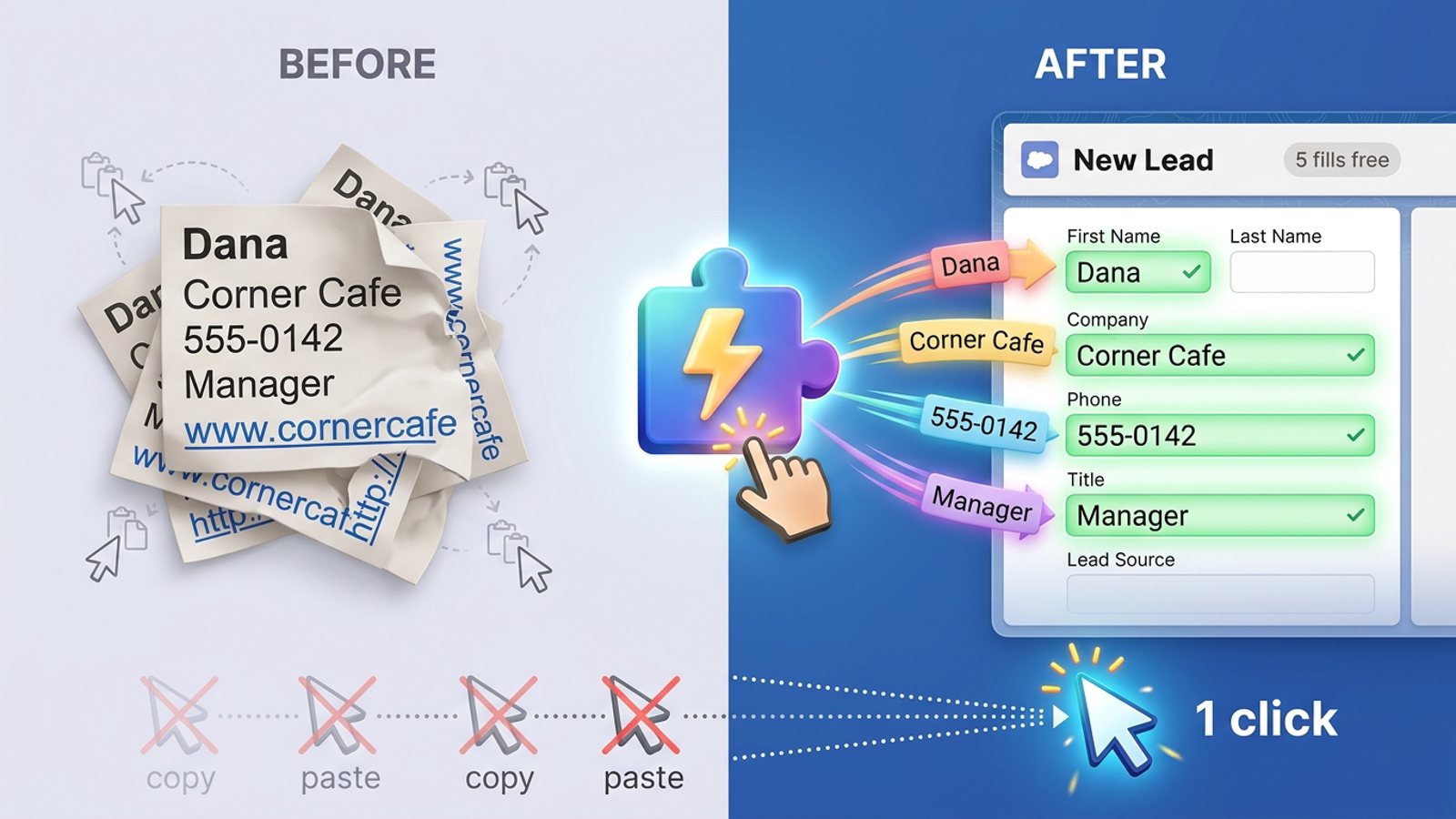
Neither extreme wins outright. Manual copy-paste into Salesforce is free but slow and error-prone, and builds no reusable shortcut. Magical only pays off after you build a template or transfer for each field mapping you repeat. If your lead data arrives messy and different every time, a zero-setup AI form filler for Salesforce is the more honest fit.
If you are the rep pasting an email signature into the New Lead form for the fifth time today, this is your decision to make — and it comes down to how repeatable your data really is. Install SmartFill Free and see the difference on your next lead.
Is Magical worth it compared with copy-pasting lead data into Salesforce?
It depends on repetition. Magical is worth it when you transfer the same field patterns into Salesforce every day and will invest the setup time to build those templates. Copy-paste is worth it when volume is low and the data changes shape every time — nothing to build, but also nothing to reuse.
Magical is a Chrome and Edge text-expander and autofill extension by HeyAutoFill Inc. Its Chrome Web Store listing, updated 4 April 2026, says it works across 10,000,000+ sites including Salesforce, HubSpot and Zoho, and positions itself as not dependent on integrations, APIs or workflow builders. That is the pitch: a browser layer that types for you.
The catch sits in the middle of that sentence — templates. Magical's own help docs (2024) describe creating templates (snippets) in a workspace or browser panel, triggered by typing // or a custom shortcut, then inserting them on sites including Salesforce. Until that template exists, Magical is just an extension sitting idle.
How much setup does Magical need before it saves you time on Salesforce?
You need one working template or transfer per repeating field mapping. That is the real cost of Magical, and it is paid up front, before the first saved minute.
- Install the extension in Chrome or Edge.
- Open the Magical panel and create a template for the fields you fill most.
- Assign a trigger, such as
//or a custom shortcut, per Magical's help docs. - Test it on Salesforce with fictitious data before you trust it with a real lead.
- Maintain it whenever your Salesforce fields, picklists or page layouts change.
Step 5 is the one people forget. A template built for last quarter's lead layout does not quietly fix itself.
Say you run a two-person sales team and log 15 inbound leads a day, each arriving as a pasted paragraph from a contact form. Your fields are consistent: name, company, email, phone, source. Build one template and Magical earns its keep within a week. Now say those same 15 leads arrive as email signatures, forwarded intros and LinkedIn bios, each formatted differently. You would be rebuilding the template most days — not a shortcut, a second job.
A template only saves time on the data it was built for; the moment your source text changes shape, the clock resets.
Is Magical free for filling Salesforce lead forms?
A free tier exists, but the AI assistant reportedly is not part of it. Forum users on Alura (June 2026) report that Magical's AI assistant is not available on the free or trial plan, leaving basic templates and text automation. Treat that as anecdotal — it comes from a forum, not from Magical's own documentation.
So the free-plan question is really two questions: can you use Magical free, and can you use the AI part free? The forum reports suggest the answer to the second is no.
How much does Magical cost now that pricing moved to "Contact Sales"?
There is no published self-serve price as of late 2026. A third-party competitor blog (Clipboard History Pro, checked 23 October 2026) reports that Magical's pricing page shows "Book a demo" and "Contact Sales" instead of a self-serve plan. Older third-party figures — roughly $6.50 to $10 per month per seat, or $49 and $199 tiers — conflict with each other and should not be quoted as current. Check getmagical.com yourself before you budget.
SmartFill's pricing is published on its site: a free plan with 5 fills to start and then 3 per day forever, and unlimited fills on Pro for $9.99/month, as of November 2026. Prices can change.
Magical vs copy-paste vs SmartFill vs Salesforce's own tools: which should you use?
Here is the honest comparison of the tools we looked at, with SmartFill first because it is ours.
| Option | Best for | Key features | Price / free option | Watch-outs |
|---|---|---|---|---|
| SmartFill — Our pick | Messy, one-off lead text | AI fills Salesforce forms from pasted text | Free: 5 fills, then 3/day; Pro $9.99/mo | Desktop Chrome only |
| Manual copy-paste | Very low volume | Nothing to install | Free | Slowest; error-prone; no shortcut |
| Magical | Repeating identical transfers | Templates, // trigger, 10M+ sites | Free tier; paid pricing on request | Setup per template; browser only |
| Salesforce import tools | Bulk clean CSVs | Data Import Wizard, Data Loader | Native to Salesforce | Needs clean, mapped CSV |
| Web-to-Lead | Website form capture | Salesforce-generated HTML form | Native to Salesforce | Only captures your own form |
Our pick is SmartFill of the tools we compared, for one specific reason: it needs no setup. You install the extension, open Salesforce and your source text in separate tabs, copy the lead details — even if messy — click the SmartFill icon, and the form fills. It works with email signatures and LinkedIn bios, fills any Salesforce object including custom ones, and there is no field limit. Text is processed in real time and not stored, and no lead database is built. It is desktop Chrome only.
If you mainly need to repeat the same snippet across many web apps, Magical is the more direct choice — its template library is built for exactly that, and it covers 10,000,000+ sites. If you mainly need to push 5,000 clean rows into Salesforce once a quarter, use Salesforce's own Data Import Wizard or Data Loader (Revenue Grid guide, January 2026) — neither extension is the right tool for bulk.
SmartFill is made by the team behind this blog.
What does Magical store, and is it safe for lead PII?
Magical's Chrome Web Store data-disclosure section states it processes personally identifiable information, location, web history, user activity and website content. A third-party review (UgliAI Hub, July 2026) says Magical's privacy policy tells users not to store passwords, card numbers, health information or similar sensitive data in the service.
That is not a scandal — it is a description of what a text-expander does. But it matters when the text you handle is a prospect's name, email and phone number.
SmartFill's position, per the product facts: nothing sent to the AI is saved, and no lead database is built. Text is processed in real time.
If data handling is your main worry, the deeper comparison is in what the best secure AI form filler for Salesforce lead data looks like.
When should you skip both and use Salesforce's own import tools?
When the data is already clean and there is a lot of it. Salesforce's Data Import Wizard handles smaller, guided imports; Data Loader handles large or complex datasets (Revenue Grid, January 2026). Import failures most often come from field mapping, CSV formatting — UTF-8 is required — and missing required fields, and External IDs enable reliable upserts for recurring imports.
There is a subtler trap too. Contacts imported from a trade-show list carry company names, not Salesforce IDs, so every import tool has to resolve the parent Account from something else in the row — otherwise records land orphaned or duplicated (Skyvia, August 2026).
So the split is clean:
- Clean CSV, high volume → Data Import Wizard or Data Loader.
- Pasted text, one record at a time → an AI filler.
- Repeating identical form fills → Magical's templates.
Can you just paste messy lead text instead of building a template?
Yes — that is exactly what an AI filler is for. The technique is worth learning even if you never install anything: keep the source text and the Salesforce form side by side, read the source once, and fill top to bottom in field order rather than jumping around the form. Most copy-paste errors come from jumping.
The limit of the manual version is that it does not scale past a handful of records, and it does not help when the source is a wall of text with the company name buried in the third line. That is the gap SmartFill closes: paste the wall of text, let the AI map it to fields.
If you want the same decision framed around one record rather than a workflow, read whether a Salesforce form filler is worth it versus copy-pasting lead data.
Does an AI filler work when the source data is inconsistent?
That is the case it is built for. Email signatures, LinkedIn bios, forwarded intros and meeting notes all have different shapes — and a template-based tool struggles precisely because there is no stable pattern to template.
Salesforce's own native options sit at different ends of this. Einstein Autofill (Beta) turns call and chat conversations into form suggestions in Lightning Experience, in Enterprise and Unlimited editions of Industries clouds, per the Spring '25 release notes. Field Generation Prompt Templates let admins use generative AI to populate fields on Lightning record pages (sfdc-lightning.com, October 2025). Both keep data inside Salesforce, and both need admin setup. Neither is built around "paste this messy signature into the New Lead form."
Building that mapping yourself is a real project: a developer walkthrough (Medium, August 2025) shows mapping unstructured free text to a Salesforce data model takes the Models API, Apex and a Lightning Web Component.
What is the fastest way to fill a custom Salesforce object, not just Lead?
Paste the text and let the tool map it — provided the tool fills any object. SmartFill fills Leads, Contacts, Cases and custom objects, with no limit on the number of fields it fills at once, per the product facts. Magical works on Salesforce custom objects too, but through the same template model: a transfer you build first.
For a custom object with 20 fields, that difference is the whole decision. One approach needs a 20-field template maintained forever. The other needs a paste and a click.
So which one is actually worth it?
Copy-paste is worth it only while your volume is low enough that the minutes do not add up. Magical is worth it if your Salesforce entry is genuinely repetitive and you will build the templates. If your lead data arrives messy and different every time — which is most sales teams' reality — a zero-setup AI filler is the honest answer, and it is the one we would pick.
Start with the free plan and judge it on your own leads: Install SmartFill Free — 5 fills to start, then 3 a day forever.
Sources
- Magical: Text Expander & Autofill Chrome listing — Chrome Web Store / HeyAutoFill Inc., updated 2026-04-04
- Magical Chrome listing — Chrome Web Store, date not given
- Step 3: Navigating Magical, the workspace, & panel — Magical Help Center, 2024-10-20
- Creating templates — Magical Help Center, 2024-10-20
- A Magical alternative with a published price — Clipboard History Pro blog, checked 2026-10-23
- Clipboard History Pro vs Text Blaze vs Magical — clipboardextension.com, date not given
- Magical Review (2026): AI Text Expander Worth It? — ToolMango, 2026-10-02
- Magical review listing — Market Genius AI, date not given
- Magical Review, Pricing & Guide — UgliAI Hub, 2026-07-19
- Getmagical Review 2026 — ShouldIUse, 2026-10-05
- Alura forum topic on Magical AI availability — Alura, 2026-06-01
- Import Wizard Best Practices: Q&A — Cloudingo, 2025-11-02
- How to Import Data into Salesforce — Revenue Grid, 2026-01-21
- Import CSV into Salesforce: 3 Methods, Limits and Lookups — Skyvia, 2026-08-20
- Boost Efficiency with Einstein Autofill (Beta) — Salesforce Spring '25 Release Notes, date not given
- How to Create a Field Generation Prompt Template in Salesforce — sfdc-lightning.com, 2025-10-02
- Snippet: From Free Text to Your Salesforce Data Model — Medium, 2025-08-24
- Web-to-Lead guide — CloudAmp via Salesforce AppExchange, date not given
- Are browser extensions safe? — MEFMobile, 2026-10-04
- Chrome Web Store permission warnings — Google Help, date not given