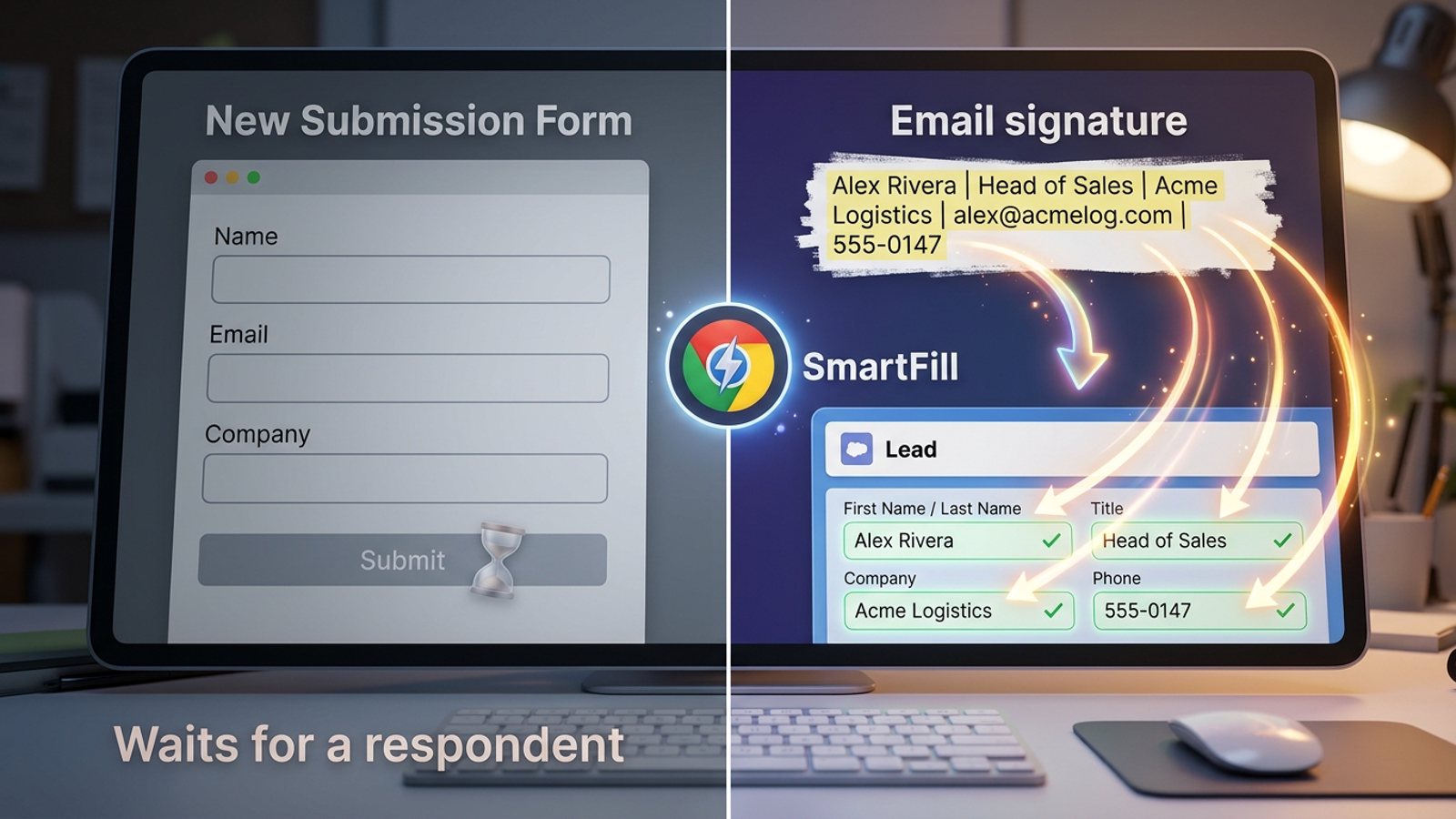
Most Formstack alternatives are still form builders: Typeform, Jotform and Salesforce Web-to-Lead all publish a new form and wait for a new submission. If your job is to get lead data you already hold into a Salesforce record that's already open, none of those types it for you. A Salesforce-first AI form filler for Salesforce does: paste the messy text, and the fields fill in your own browser.
Install SmartFill Free — paste the lead text, watch the open Salesforce form fill itself.
Is Formstack a form builder or a Salesforce data-entry tool?
Formstack is a form builder. Its Salesforce integration pushes submissions from forms you build in Formstack into Salesforce, and submissions are also stored in Formstack — that's how Formstack's own Help Center describes the two-product split (2025). Its second product, Forms for Salesforce, is built drag-and-drop inside the Salesforce org from your Salesforce data model.
Both are capture tools. Neither is documented to type lead data you already hold into a record you already have open.
Formstack is good at what it does — its own product page claims Forms for Salesforce saves teams "an average of 20 hours per week" (vendor claim, undated), and its AMA notes dynamic prefill that sends a customer a prefilled link so they never re-enter the same information (article dated 2024). But if your SDR just finished a call and has the details in a note, a form builder has nothing to capture.
What are the best formstack alternatives salesforce teams should compare?
Five options, and the right one depends entirely on which job you have. Here they are side by side; the detail on each follows.
| Option | Best for | Key features | Price / free option | Watch-outs |
|---|---|---|---|---|
| SmartFill (Our pick) | Filling an existing Salesforce record from pasted text | AI fills any Salesforce form from messy text, no setup, unlimited fields | Free: 5 fills, then 3/day; Pro $9.99/mo | Desktop Chrome only |
| Formstack | Publishing new forms that feed Salesforce | Form builder, native Forms for Salesforce, prefill, eSignature | From $83/mo annual; 14-day trial | Build-a-form model; cost rises with users |
| Typeform | Polished respondent-facing forms | Conversational forms, native Salesforce integration | Free plan; Salesforce on Growth Flow | Salesforce plan priced $266–379/mo by third parties |
| Jotform | Budget teams wanting a free tier | Many templates, Salesforce on all plans | Free tier; paid from ~$34/mo (third party) | Still a new-form platform |
| Salesforce Web-to-Lead | Website lead capture, no vendor | Native to Salesforce, HTML generated in Setup | Built into Salesforce | Field changes need regenerated HTML; no prefilled picklists |
SmartFill is made by the team behind this blog.
SmartFill — our pick for filling forms you already have open
SmartFill is a Chrome extension that uses AI to populate Salesforce forms from any pasted text. You don't build a form, map fields or configure anything: install it in about 10 seconds with no sign-up, open Salesforce and your source text in separate tabs, copy the lead details even if they're a mess, then click the SmartFill icon and watch the form fill.
It handles the messy, unstructured data form builders can't ingest — email signatures, LinkedIn bios, call notes — and it fills every field, with no limit on how many fields it fills at once. Text is processed in real time and not stored, so no lead database is built. It works on anything that runs in a Chrome browser, so Salesforce Classic and Lightning are both covered, and it fills every Salesforce object, leads, contacts, accounts and the rest.
Price as of November 2026: free plan with 5 fills to start, then 3 per day forever; Pro is $9.99/month for unlimited fills. Prices can change.
The honest limit: it's desktop only, because it's a Chrome extension. If you work from a phone, this isn't your tool.
Install SmartFill Free and fill your next lead without typing a single field.
Formstack — best if you need to publish new forms
Formstack is the incumbent here, and for the right job it's strong. Forms for Salesforce builds forms inside the org from the Salesforce data model, and the platform adds document generation and eSignature alongside forms. Dynamic prefill lets you send a prefilled link so customers don't re-enter information.
Pricing as of November 2026, from Formstack's pricing page: Forms is $83/month billed annually ($99 monthly) for 1 builder user, 25 forms, 1,000 submissions per form and 2GB storage; Suite is $250/month annually ($299 monthly); Salesforce Solutions and Enterprise are custom-priced. There's a 14-day free trial, no credit card. A 2024 Formstack page still carried older figures ($50 annual / $59 monthly), which shows the pricing has moved — use only the current page.
Where it falls short for this buyer: it's a form builder, so it captures new submissions through a Formstack form rather than typing data you already hold into an existing record. A third-party review (Titan DXP, 2025-12-16) lists cons including cost at scale, paid add-ons for advanced features and a learning curve for teammates. Formstack's own AMA (2024) is candid that duplicate management is hard for names and recommends validation on phone and email.
If you mainly need to publish customer intake or survey forms that route into Salesforce, Formstack is the more direct choice.
Typeform — best for a polished respondent experience
Typeform's strength is the conversational, good-looking form a respondent fills in. The catch for this comparison is the Salesforce integration: third-party pricing pages (Noca, 2026-11-16; Consultants In-A-Box, 2026-11-16) report it sits only on the Growth Flow plan, priced at $379/month or $266/month billed annually after a 14-day trial that requires a credit card. Those are third-party figures, not Typeform's own page, and they disagree slightly with each other.
Growth Flow includes 1,500 enriched responses per month and email/SMS follow-ups, per Noca. That's a real product — for marketing and survey forms sent to respondents. It's expensive if your actual need is entering data you already have, and it's a respondent-facing form, not something that fills an internal Salesforce record.
If you mainly need beautiful forms that respondents enjoy filling in, Typeform is the more direct choice.
Jotform — best budget form builder with Salesforce on every plan
Jotform's pitch is breadth and a genuine free tier. Jotform's own support reply (2024-07-14) states Salesforce integration is available on all plans, with usage limits varying by tier. A third-party comparison (WorkflowKits, updated 2026-04-28) lists a free tier, paid plans from $34/month, and Gold with HIPAA at $99/month billed annually — third-party figures, so confirm on Jotform's page.
The limitation is structural, not a knock: Jotform is a build-a-form platform. It collects submissions into a new form. It isn't documented to fill an existing Salesforce record from pasted text.
If you mainly need a cheap, flexible form builder with a free tier and Salesforce on every plan, Jotform is the more direct choice.
Salesforce Web-to-Lead — best if you own a website and want no vendor
Web-to-Lead is native to Salesforce and generated from Setup: you create the form HTML and embed it on your site so submissions become Leads. No vendor, no separate listed price.
The friction is in the maintenance. Per Salesforce Help (2026-09-21) and StoreConnect's support docs (2026-10-08), adding a field means creating the Lead custom field first and then regenerating the HTML, some CSS is needed to match your site design, and Web-to-Lead doesn't support pre-filled picklists (Microsoft Learn, 2025-05-27).
If you mainly need website visitors to become Leads automatically, Web-to-Lead is the more direct choice.
Formstack vs Typeform vs Jotform — how do they actually differ for Salesforce?
All three are form builders with a Salesforce integration, and the differences are price, polish and breadth. Formstack has the deepest Salesforce-native option (Forms for Salesforce, built inside the org). Typeform has the most polished respondent experience but puts Salesforce behind its top plan. Jotform has the lowest entry point and Salesforce on every tier.
None of them changes the core model: you publish a form, a respondent fills it, a submission arrives. If the data is already in your inbox, all three leave you typing.
Do I need to build a new form, or can I fill the existing record?
That's the decision that picks your tool, so make it before you compare prices.
- Decide the source of the data. New submission from a person outside your company? Form builder or Web-to-Lead. Data you already hold — an email signature, a LinkedIn profile, a call note? You need a filler.
- For a new form: pick the builder or Web-to-Lead, map your fields, connect or sync to Salesforce, publish.
- For an existing record: open the Lead, Contact or Case in Salesforce.
- Have the lead data in hand in a second tab.
- Paste it into an AI form filler, review the populated fields, and save.
Step 5 is where SmartFill fits: it's a Salesforce form filler that works on the record you already have open, with no form to build first. If you want the deeper version of this decision, our guide to the best way to fill Salesforce forms without typing walks through it.
A form builder waits for a stranger to fill in a form. A form filler types the lead you already have into the record already on your screen.
Can these tools handle messy lead data like an email signature or a LinkedIn blurb?
Form builders can't, because the data never reaches them in that shape — they only receive what a respondent types into the fields you defined. That's the gap SmartFill was built for: it takes messy, unstructured text and works out which value belongs in which field, on any Salesforce form, with no field mapping to set up.
Say you run a two-person sales team and a prospect emails you: name, title, company, mobile and a meeting time, all buried in a signature block with a legal disclaimer under it. With a builder you'd re-key it. With SmartFill you copy the whole email, click the icon, and review. Our post on filling Salesforce forms from a LinkedIn profile you paste in shows the same flow for profile text.
Is a free option enough, or do I need to pay?
It depends on volume, and the free tiers differ in kind, not just size.
- SmartFill free: 5 fills to start, then 3 per day forever. Pro is $9.99/month for unlimited fills (as of November 2026; prices can change).
- Formstack: 14-day free trial of the core Forms product, no credit card, then from $83/month billed annually.
- Typeform: a free plan exists; the Salesforce integration is reported on the paid Growth Flow plan.
- Jotform: a free tier with Salesforce integration on all plans, per Jotform support.
- Web-to-Lead: built into Salesforce.
If you enter a handful of leads a day, a free plan may cover you. If you're an SDR logging every call, unlimited at $9.99/month is the cheaper line item by a wide margin.
Install SmartFill Free and stop re-typing lead data you already have.
Sources
- Formstack Pricing (Formstack, undated)
- Formstack and Forms for Salesforce Comparative Guide (Formstack Help Center, 2025-09-09)
- Forms for Salesforce AMA Recap (Formstack blog, article 2024-03-18)
- Formstack for Salesforce product page (Formstack, undated)
- Typeform Pricing 2026 (Noca, 2026-11-16)
- Typeform Growth Flow and Add-ons (Consultants In-A-Box, 2026-11-16)
- Typeform pricing (Position Is Everything, 2026-09-27)
- Is Salesforce integration available with all plans? (Jotform Answers, 2024-07-14)
- Jotform vs Formstack (WorkflowKits, updated 2026-04-28)
- Web-to-Lead overview (Salesforce, undated)
- Web-to-Lead field/HTML help (Salesforce Help, 2026-09-21)
- Web-to-Lead and Web-to-Case integration (StoreConnect support, 2026-10-08)
- Marketplace lead management – Salesforce (Microsoft Learn, 2025-05-27)
- Dynamic form alternatives (Titan DXP blog, 2025-12-16)